
Uptime reports: SLA, downtime and CSV export
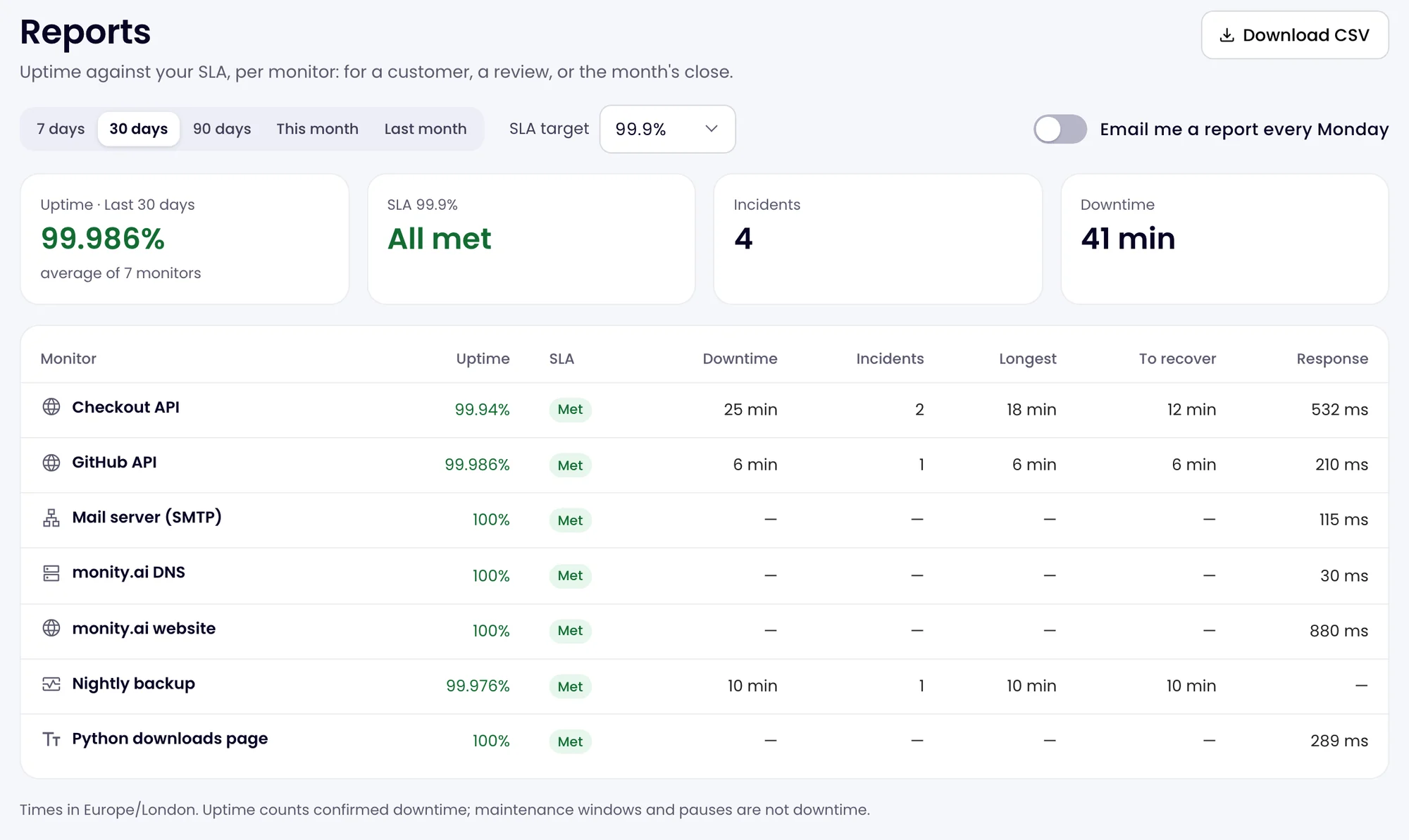
Uptime reports show each monitor’s uptime over a period against an SLA target, with its downtime, incidents, longest outage and time to recover. Download them as CSV for a client or a monthly review, or get a summary by email every Monday.
Open a report
On the Uptime page, click Reports at the top right. The report covers the monitors in the current workspace.
-
Choose the period
7 days, 30 days (the default), 90 days, This month or Last month. Months follow the calendar in your time zone, so Last month is the figure to send a client at the start of a month.
-
Set the SLA target
Choose the uptime you promised: 99%, 99.5%, 99.9% (the default), 99.95% or 99.99%. Each monitor is marked Met or Missed, and the totals count the misses.
What the columns mean
| Column | Meaning |
|---|---|
| Uptime | The share of the period the monitor was not in a confirmed outage. |
| SLA | Whether the uptime reached your target. |
| Downtime | The total time down in the period. |
| Incidents | How many outages there were. |
| Longest | The longest single outage. |
| To recover | The average time from going down to being back up (mean time to recover). |
| Response | The average response time. Heartbeat monitors have none. |
Uptime counts confirmed downtime only. Time in maintenance windows and while a monitor is paused is not downtime. The note under the table says which time zone the report uses.
Download the CSV
Click Download CSV for the period and target on screen. Each row is a monitor with its address, kind, uptime, SLA result, downtime (in seconds and in words), incidents, longest outage, time to recover and average response time. It opens safely in Excel, Numbers and Google Sheets.
Get a weekly report by email
Switch on Email me a report every Monday. Each Monday morning (between 07:00 and 12:00 in your time zone) you get the past week’s uptime and incidents, with your monitors listed worst first, up to 25 of them. The switch is per person, so each member of the team decides for themselves.
