
Uptime monitoring with Monity AI, the API and MCP
You don’t have to use the Uptime page to manage uptime monitors. Ask Monity AI in plain words, create and read monitors from your own code with the REST API, or let an MCP client such as Cursor or Claude Desktop do it with an API key.
Ask Monity AI
Open Ask Monity and say what you want to know about, for example:
- “Tell me when example.com goes down.”
- “Check that our shop’s homepage still says Add to cart.”
- “Watch port 5432 on db.example.com every minute.”
- “Our backup runs every night at 2. Alert me if it doesn’t.”
Monity AI picks the kind of monitor and shows a card with what it will check, how often, the credits a month and where alerts go. Nothing is created until you click Create monitor. For a heartbeat it then gives you the link your job should call.
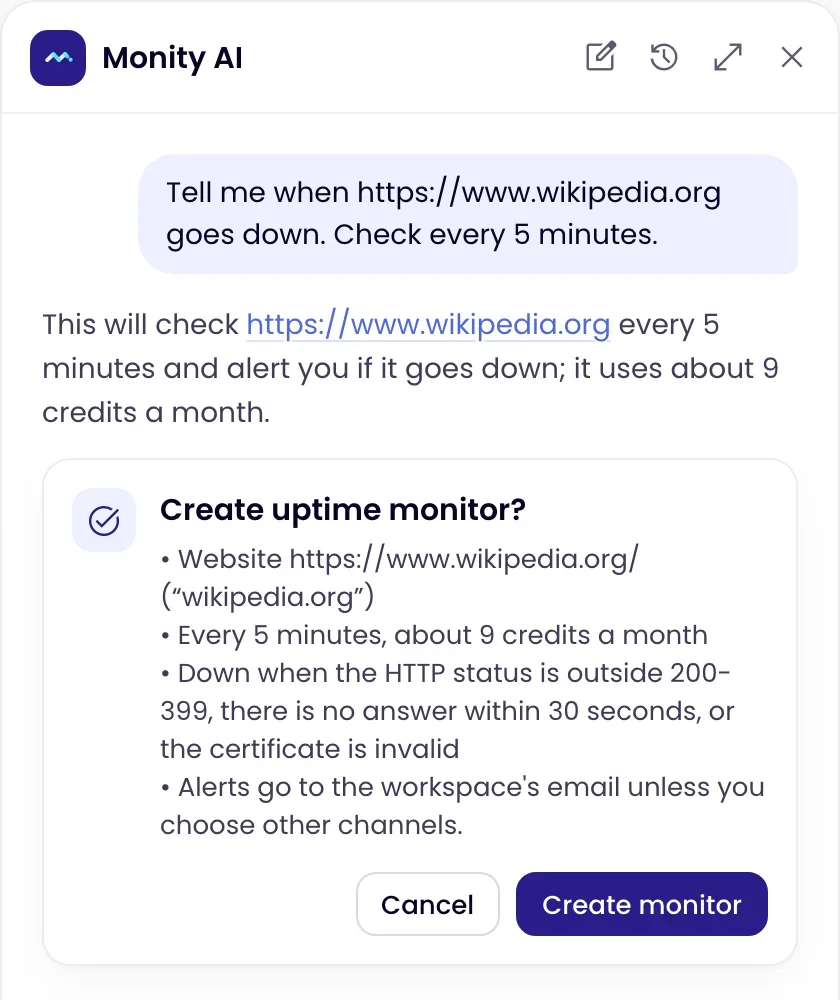
It also answers questions about your monitors, such as “Is my site up?”, “Which sites were down this week?” or “How is the API doing?”, and can change a monitor’s interval or alert rules, pause, resume or check one now. Changes to a monitor you already have wait for you to confirm them.
REST API
Create a key in Integrations as described in the REST API guide; creating or changing monitors needs Allow write access. Uptime monitors have their own endpoints under https://api.monity.ai/api/v1/uptime:
| Request | Does |
|---|---|
GET /uptime/plan |
The intervals your plan allows and the credits each uses a month. |
GET /uptime/monitors |
Every uptime monitor with its status, 24-hour and 30-day uptime and response time, plus open and recent incidents. Add ?workspaceId= for one workspace. |
GET /uptime/monitors/{uuid} |
One monitor: its settings, uptime over 24 hours, 7, 30 and 90 days, response times and incidents. |
GET /uptime/monitors/{uuid}/incidents |
Its incidents, newest first, with cause and duration. |
POST /uptime/monitors |
Creates a monitor (write key). |
PATCH /uptime/monitors/{uuid} |
Changes it; fields you leave out stay as they are (write key). |
POST /uptime/monitors/{uuid}/pause, /resume, /check |
Pauses, resumes or checks it now (write key). |
Create a website monitor that checks every minute:
curl -X POST https://api.monity.ai/api/v1/uptime/monitors \
  -H "Authorization: Bearer mk_live_…" \
  -H "Content-Type: application/json" \
  -d '{ "url": "https://example.com", "kind": "http", "intervalSeconds": 60 }'
And a heartbeat for a nightly job, which returns the heartbeatUrl to call:
curl -X POST https://api.monity.ai/api/v1/uptime/monitors \
  -H "Authorization: Bearer mk_live_…" \
  -H "Content-Type: application/json" \
-d '{ "kind": "heartbeat", "name": "Nightly backup", "intervalSeconds": 86400, "graceSeconds": 900 }'| Field | Notes |
|---|---|
kind |
http (the default), keyword, port, dns or heartbeat. |
url |
Required except for heartbeats. A bare host name for port and dns. |
intervalSeconds |
30, 60, 120, 300, 600, 900, 1800 or 3600; heartbeats also 21600, 43200 and 86400. Not faster than your plan allows. |
keyword, keywordMode |
Keyword monitors: the text, and contains or absent. |
port; dnsRecordType, dnsExpected |
Port and DNS monitors. |
expectedStatus, assertions |
Good status codes ("200-399" by default) and up to 10 checks on the answer, such as { "source": "json", "path": "$.status", "op": "equals", "value": "ok" }. |
alertAfterSeconds, remindEverySeconds, alertOnRecovery |
When to alert, how often to remind, and whether to say when it is back. |
graceSeconds, slowThresholdMs, sslExpiryDays, domainExpiryDays |
Heartbeat grace period, slow alerts, and certificate and domain warnings. |
A request your plan does not allow answers 400 with the reason per field. If a monitor in the workspace already checks the address, the answer is 409 with that monitor’s existingUuid. Maintenance windows, incident notes, status pages and reports are managed in the app.
MCP clients
Connect Cursor, Claude Desktop or another MCP client to https://api.monity.ai/mcp with an API key from the MCP clients card in Integrations. Three tools cover uptime: get_uptime_status reads monitors and incidents, and, with a write key, create_uptime_monitor and update_uptime_monitor create and change them. The monity.ai apps in ChatGPT and Claude (see Use monity.ai in ChatGPT and Claude) do not include the uptime tools yet.