
Skip to content
Comparison · Updated October 2026

monity.ai vs Distill.io

Distill.io gives you a browser extension, local monitors and a lot of cloud checks for the price. monity.ai runs everything in the cloud, takes the rule as a sentence, confirms with AI what it reads and sends alerts to any channel on any plan.

  • Free basic plan
  • No credit card
  • Verified October 2026
monity.ai vs D Distill.io
Pick monity.ai if
  • You want nothing to depend on a browser being open
  • You want to describe each change in a sentence
  • You want a team workspace with roles
Pick Distill.io if
  • You want a browser extension and local monitors
  • You need many cloud checks for little money
  • You need macros or checks every 2 minutes

Monity

Monity is an AI-powered website change monitoring platform for teams. Set up monitors in plain English, receive source-linked alerts, and route work to Slack, Teams, email, webhooks, or your API.

AI setup Team routing Source evidence Security review ready
Feature comparison

Monity vs Distill.io, feature by feature.

Detailed capability checks across setup, monitoring, alerts, security, and pricing.

Capability
Monity
Distill.io
Free plan
3 tasks, 100 checks a month, every 3 hours
25 monitors (5 in the cloud), cloud checks every 6 hours
Fastest checks
Every 5 min from Personal 10k ($50/mo yearly) and Business 20k; every minute on Enterprise
Every 2 min on Flexi ($80+/month)
Runs in the cloud
Browser extension
Chrome and Firefox
Plain-English “Notify me when” rules
Not listed
AI setup verification, item-level data
Not listed
Log in or click before each check
Macros on paid plans
Alert channels
Email, Slack, Teams, Discord, Telegram, Google Sheets, webhook and app push, on every plan
See Distill.io’s pricing page
iOS and Android app with push
Not listed
Team workspaces
Workspaces with roles; seats on Business
Enterprise plan with a shared watchlist
Pricing

What you'd pay, side by side.

Plans differ in what they count, so compare what each includes. Check Distill.io's current pricing page before you buy.

monity.ai
Free$03 tasks · 100 checks a month · every 3 hours
Personal 1k$10/mo20 tasks · 1,000 checks a month · every hour · billed yearly ($12 monthly)
Business 1k$25/mo30 tasks · 1,000 checks a month · every 15 minutes · billed yearly ($35 monthly)
Business 10k, 5 seats$50/mo100 tasks · 10,000 checks a month · every 15 minutes · billed yearly ($70 monthly)
See all plans →
DDistill.io
Free$0: 25 monitors (5 in the cloud), 1,000 cloud checks a month
Starter$15/month: 50 monitors, 30,000 cloud checks, every 10 min
Professional$35/month: 150 monitors, 100,000 cloud checks, every 5 min
Flexi$80+/month: 500+ monitors, every 2 min
Distill.io pricing →

Prices as of October 2026.

Pros and cons

The honest trade-offs.

Monity

Pros

  • Every task runs in the cloud; nothing depends on your laptop
  • Rules in plain English, judged by AI on every change
  • AI confirms what it reads; alerts name the item that changed
  • Every alert channel on every plan, plus an iOS and Android app

Cons

  • No browser extension
  • Fewer checks for the money than Distill.io’s paid plans
  • Fastest paid checks are every 5 minutes (every minute on Enterprise)

Distill.io

Pros

  • Browser extensions for Chrome and Firefox
  • 25 free monitors, 5 of them in the cloud
  • Many cloud checks for the price: 30,000 a month for $15
  • Annual billing takes 20% off

Cons

  • Free cloud checks run at most every 6 hours, with 30 email alerts a month
  • Checks every 2 minutes need Flexi, from $80 a month
Migration guide

Switching from Distill.io.

  1. List the pages you watch in Distill.io, including the ones that run in your browser, and what each should alert on.
  2. Add each page to monity.ai: describe it to the assistant, or, on a business account, use Import tasks to paste one row per page with its address, a name and, if you like, a “Notify me when” rule.
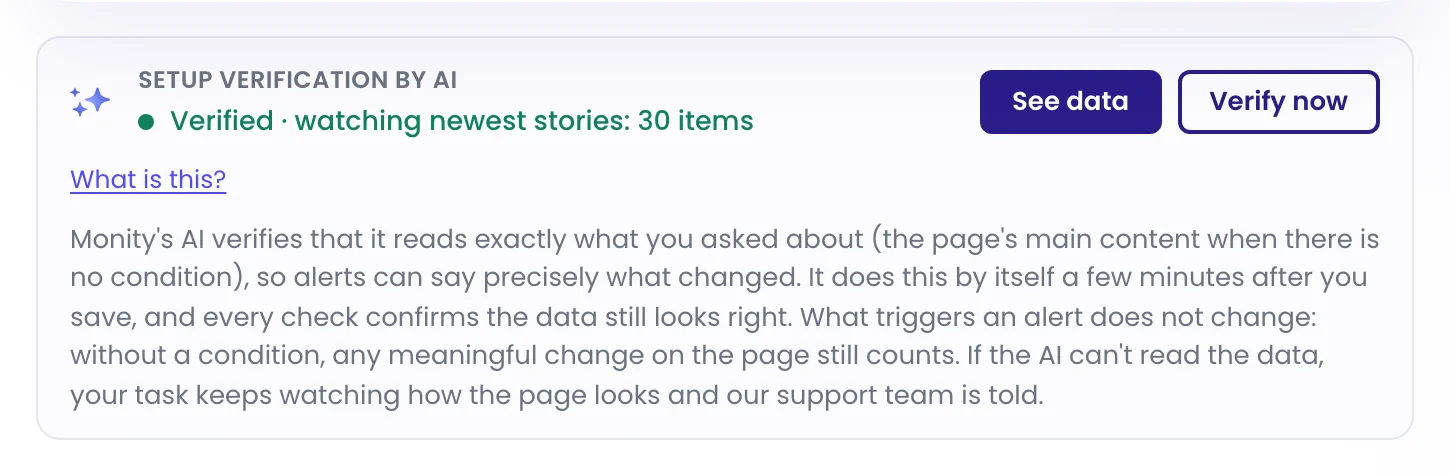
  3. Wait for setup verification. A few minutes after you save, each task shows “Verified” and what it watches, or says it couldn’t verify and keeps watching how the page looks.
  4. Add Slack, Teams, Google Sheets or webhook alerts on each task’s Channels tab. Every channel is on every plan.
  5. Run Distill.io and monity.ai side by side for a week before you cancel anything.

FAQ

Switching questions, answered

Is Distill.io cheaper than Monity?

Per check, yes: Distill.io Starter is $15 a month for 30,000 cloud checks. Monity Personal 5k is $25 a month billed yearly ($35 monthly) for 5,000 checks. Monity includes plain-English rules judged by AI, setup verification and every alert channel on every plan.

Does Monity have a browser extension?

No. Every Monity task runs in the cloud, on the schedule you choose, whether or not your computer is on.

Which one checks more often?

Distill.io checks every 2 minutes on Flexi, from $80 a month. Monity checks every 5 minutes on Personal 10k and Business 20k and up, and every minute on Enterprise.

How do I move my Distill.io monitors to Monity?

Add each page with the assistant, or paste them all with Import tasks on a business account. Monitors that ran in your browser become cloud tasks. The switching guide above has the steps.

Try monity.ai on the pages you watch in Distill.io.

Start with your three most important pages on the free plan, or try every Business feature for 7 days.

  • Free plan: 3 tasks, no card
  • 7-day Business trial
  • Every alert channel on every plan
The Setup verification by AI card on a task: Verified · watching newest stories: 30 items
Kamil, Alex and Martyna Median reply under 6 hours

Have a question?

Pricing, security, or scoping - pick a route and you will land in a real person's inbox.