
Browser Actions
Click, scroll, log in, and fill forms before each check, so Monity can monitor the pages that only appear after you interact with them.
- Click, type, choose, scroll
- Record once in a real browser
- Runs before every check
Record it
Do the steps once in a real browser. Monity repeats them before every check.
Open the live browser on the task and do what a person would: accept the cookie banner, open the tab, choose the filter. Monity turns what you did into steps, and every check runs them first and captures the page as it looks after them.
- Accept a banner, open a tab, choose a filter, sign in
- Steps run top to bottom, in the order you set
- Switch a step off to skip it without deleting it

Or build them by hand
Point at an element, choose the action, put the steps in order.
Add steps one by one and point each at an element in the page preview, or type a CSS selector. Click, type, choose from a list, hover, wait, scroll, reload, act inside an embedded frame, or remove an element before the capture.
- Click, type, choose, hover, wait, scroll and more
- Wait pauses up to 60 seconds for slow pages
- Passwords typed into a step are kept private

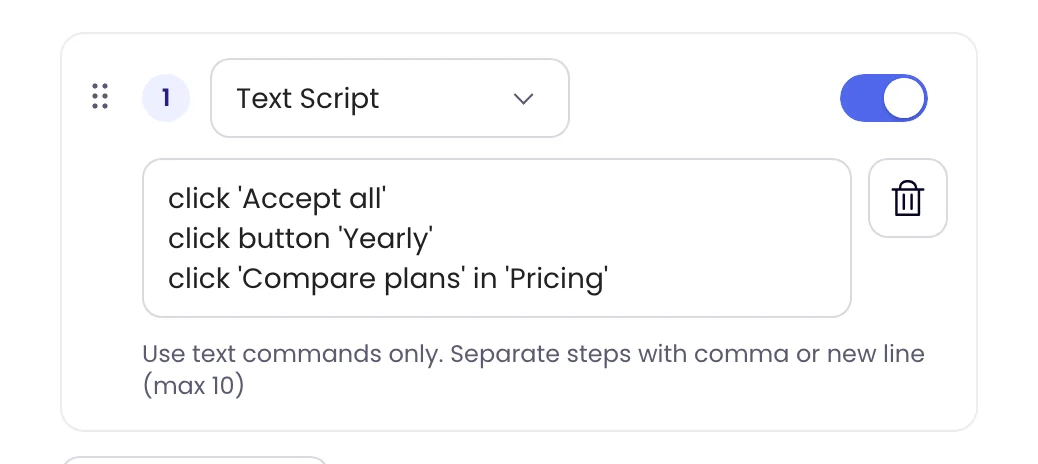
Text Script
Click things by the words on them.
Write clicks as plain commands, one per line, such as click 'Accept all' or click button 'Yearly'. Monity finds the element by its text on every check, even when the page’s code changes, which makes it the quickest way past cookie banners and tabs.
- click 'Compare plans' in 'Pricing' picks the right one when the same text appears twice
- Up to 10 commands in one step
Examples
Pages that only show what matters after a click.
The steps run before every check; the rule decides what is worth an alert.
-
 Watch the yearly prices on coastalcrm.com/pricing (steps: accept cookies, click Yearly)
Yearly Pro went from $490 to $590 Captured after the Yearly toggle, as a visitor would see it.
Watch the yearly prices on coastalcrm.com/pricing (steps: accept cookies, click Yearly)
Yearly Pro went from $490 to $590 Captured after the Yearly toggle, as a visitor would see it. Slack · #revenue
-
Watch delivery dates for postcode SW1A 1AA (steps: type the postcode, click Check)
Next-day delivery is no longer offered for SW1A The page only shows dates after a postcode is entered.
 Email · ops@company.com
-
Watch the EU size chart (steps: choose Region: EU from the list)
EU 42 is now listed as 8.5 instead of 8 The default region would have hidden this change.
 Telegram · private chat
-
Watch the full list of open roles (step: scroll the page)
Three new roles in the engineering team Roles further down load only as the page scrolls.
 Google Sheets · Hiring
Coastal CRM is an example company.
FAQ
Questions about Browser Actions
What can browser actions do?
Do I have to write selectors?
How do I monitor a page behind a login?
What if a step can’t find its element?
If a person can click to it, Monity can watch it.
Record the steps once, and every check sees the page the way you do.
- Free plan: 3 tasks, no card
- 7-day Business trial
- Every alert channel on every plan