
Uptime monitoring
Monity checks your websites, APIs, servers and scheduled jobs around the clock, confirms a failure before it alerts, and tells you when they are back, how long they were down and the likely cause.
- Website, API, port, DNS and cron jobs
- Every failure confirmed before an alert
- SSL and domain expiry warnings
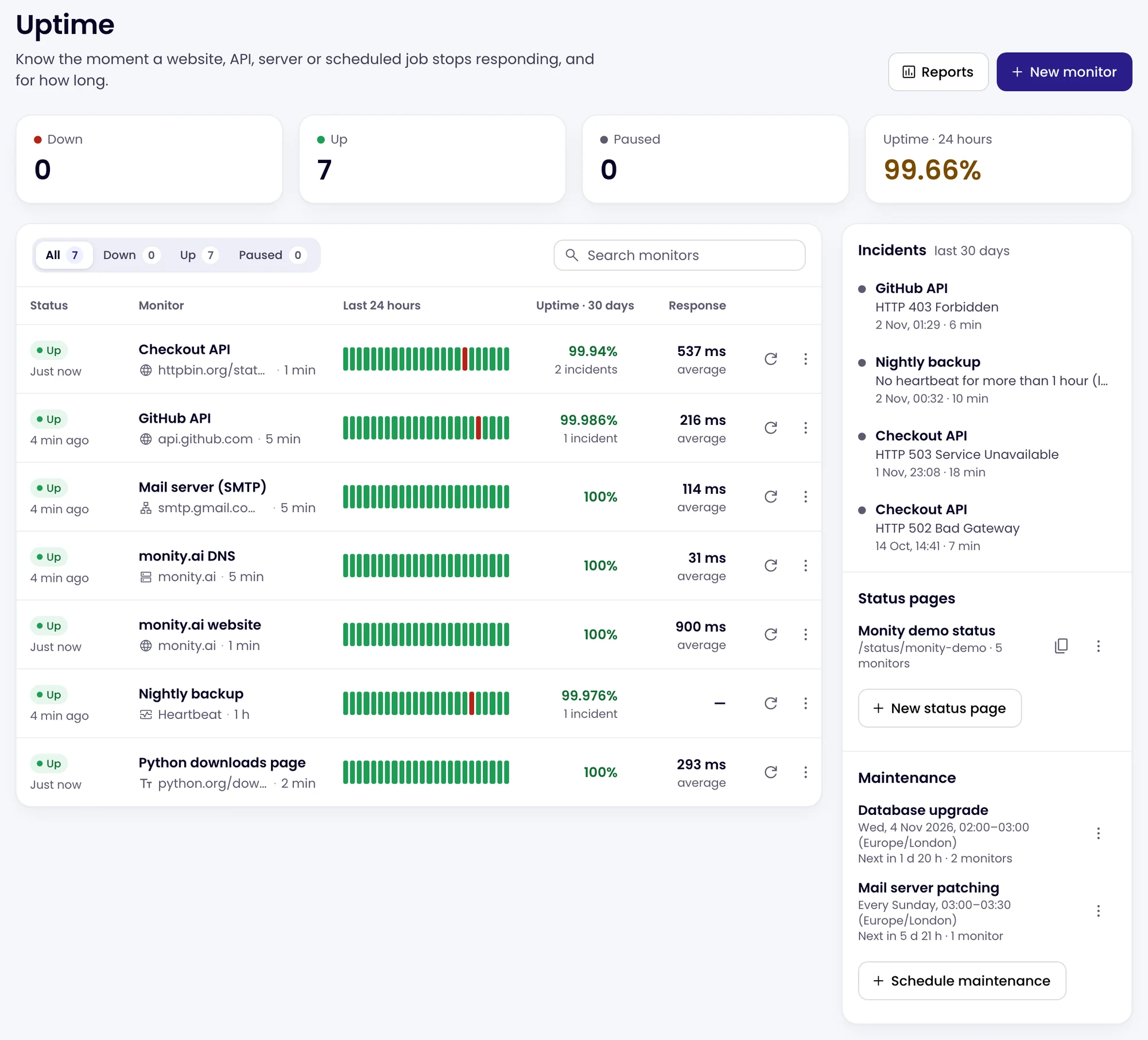
Five kinds of monitor
Websites, APIs, ports, DNS records and the text on a page.
A Website monitor checks that a page or API answers with a good HTTP status. Keyword checks that the page still contains, or no longer contains, some text. Port checks that a server accepts connections, such as mail, a database or SSH. DNS checks that a domain’s records exist and point where they should.
- Any method, headers and a body, for APIs that need them
- Checks on the answer: a JSON value such as $.status equals “ok”, or a header
- A, AAAA, CNAME, MX, TXT and NS records, asked of public resolvers
- Test now shows the answer and where the time went before you save

Cron job monitoring
A heartbeat tells you when a backup or a nightly job did not run.
A Heartbeat monitor gives you a link. Add one line to the end of your cron job, worker or backup script to call it. When no call arrives within the interval and its grace period, Monity alerts you, so you hear about the job that silently stopped, not only the one that failed loudly.
- Expected every minute up to once a day
- A grace period from 1 minute to 6 hours for jobs that run long
- A ready curl line to paste, and a new link if the old one leaks

Confirmed before it alerts
A failure is checked twice more before anyone is told.
When a check fails, Monity checks again 3 and 6 seconds later, and for network errors it first makes sure its own connection is fine. Only then does the monitor count as down and the alert go out, with the cause in the message. When it answers again you get a second alert with how long it was down.
- Alert as soon as it is confirmed, or only after it has been down for 1 to 60 minutes
- Reminders while it stays down, until someone acknowledges the incident
- An alert when responses stay slower than a limit you set, for three checks in a row
- Email, Slack, Microsoft Teams, Discord, Telegram, Google Sheets, webhooks and push in the mobile app

Incidents
Every outage comes with the likely cause and what the server answered.
Each outage opens an incident with the failed check: the HTTP status, the timings from DNS to the first byte, the response headers and the start of what the server sent back. A likely cause explains the error in plain words and lists what to look at. For websites, Monity also keeps a screenshot of what a browser showed when it went down.
- Explain this incident: Monity AI reads the failed check and suggests what to check
- Acknowledge stops the reminders and records who is on it
- Notes and a timeline of every alert, reminder and acknowledgement

SSL and domain expiry
Hear weeks ahead when a certificate or a domain is about to expire.
Website and keyword monitors read the SSL certificate on every check and warn you 14 days before it expires, or 3, 7 or 30 days if you prefer. They also look up the domain’s registration once a day and warn you 30 days before it lapses. An invalid or mismatched certificate counts as down, with the reason.
- One warning per certificate and per expiry date, not one a day
- The issuer and the registrar in the alert
- The monitor page shows days left on the certificate
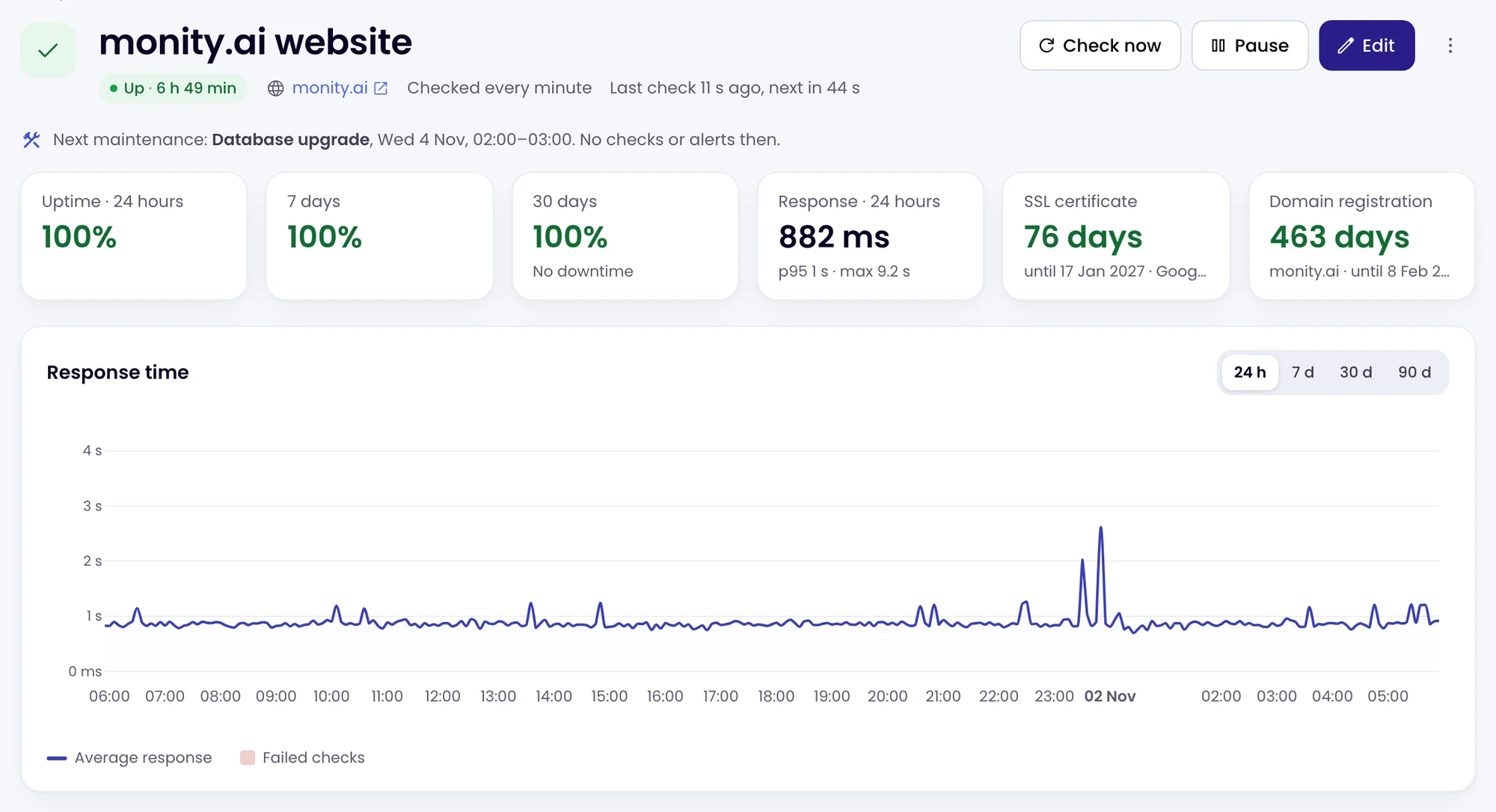
Maintenance and SLA reports
Planned downtime does not count. Your uptime against a target does.
Schedule a maintenance window once, daily, weekly or monthly, in your time zone: during it there are no checks, no alerts and no downtime counted, and your status page shows it. Reports give uptime, downtime, incidents, the longest outage and the time to recover for each monitor, against an SLA target from 99% to 99.99%.
- The last 7, 30 or 90 days, this month or last month
- Download CSV for a client or a review
- A report by email every Monday morning

What the alerts say
Set it up in a sentence. Get alerts that say what happened.
Ask Monity AI, or fill in the form. Before anything is created you see what is checked, how often and the credits a month.
-
 Tell me if api.coastalcrm.com/health stops answering or its status is not "ok"
Checkout API is down No response within 30 seconds. Down since 02/11/2026 14:02.
 Slack · #ops
-
Watch the nightly backup: it should call in once a day
Nightly backup is down No heartbeat for more than 24 hours (last one at 02:00 UTC).
 Email · ops@company.com
-
Check coastalcrm.com every minute and warn me before the certificate expires
The SSL certificate of coastalcrm.com expires in 14 days Renew it before it expires, or visitors will see a security warning.
 Microsoft Teams · Web team
-
Tell me when the shop is back
Shop is back up It was down for 6 minutes. Now responding in 412 ms.
 Telegram · private chat
Coastal CRM is an example company.
FAQ
Questions about uptime monitoring
What can Monity’s uptime monitoring check?
How often does Monity check?
How much does uptime monitoring cost?
How do you avoid false alarms?
Which alert channels can I use?
Can I show my uptime to customers?
How does it fit with page-change monitoring?
Can Monity AI or the API set up monitors?
Related
- Status pages A public page with your monitors’ status, incident updates and subscribers.
- Browser tests Sign-up, login and checkout tested in a real browser after every deploy.
- SSL certificate monitoring Certificate and domain expiry on the pages you watch for changes.
- Website QA & integrity Your own pages checked for broken layouts and unexpected changes.
Add your first monitor in a minute.
Paste an address, choose how often, and Monity starts checking. The free plan checks every 5 minutes.
- Free plan: 3 tasks, no card
- 7-day Business trial
- Every alert channel on every plan