
Using Slack notifications for monitored pages
Slack notifications in monity.ai allow you to send real-time alerts directly to your chosen Slack channel whenever a monitored page changes. This helps your team stay aligned without constantly checking dashboards or emails.
Before you start
- You need a Slack workspace where you have permission to install apps.
- You must already have created a monitoring task in monity.ai.
How Slack integration works in monity.ai
Step 1 – Create or open a task
- Log in to your monity.ai dashboard.
- Create a new monitoring task or open an existing one.
- Configure your URL, monitoring type and other task settings as required.
Note: Slack notifications can only be enabled once a task exists.
Step 2 – Open notification settings
- Inside the task settings panel, locate Notifications (positioned above the main task settings section).
- Click to expand the notification options.
- Toggle Slack to enable it.
Step 3 – Connect Slack
- Click Connect to Slack.
- You will be redirected to Slack to authorise monity.ai.
- Review the requested permissions and click Allow.
This permission allows monity.ai to send change alerts to your selected Slack channel.
Step 4 – Choose a Slack channel
- After authorisation, you will be redirected back to monity.ai.
- A Slack channel dropdown will now be visible.
- Select the channel where you want change notifications to appear.
- Click Save.
What happens after setup
- monity.ai monitors your selected page.
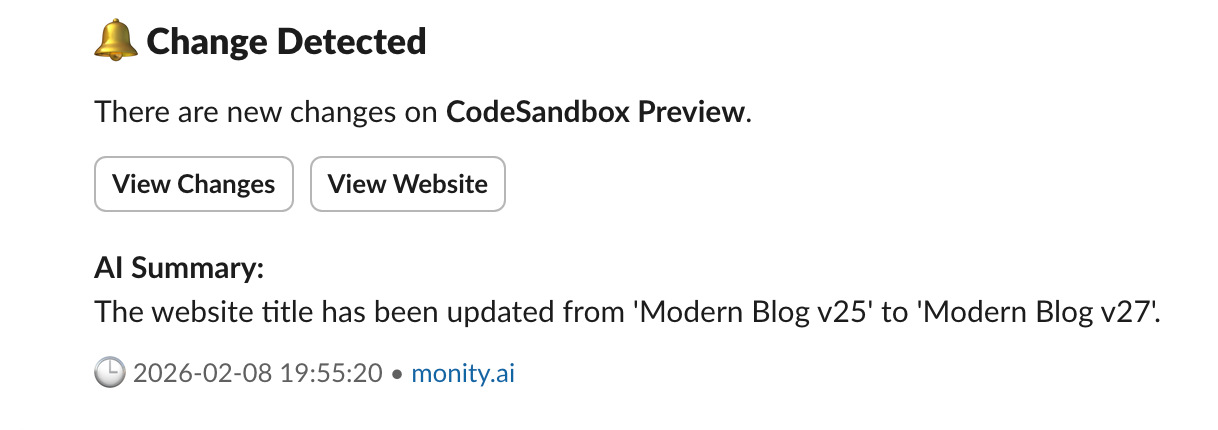
- When a change is detected, a notification is posted directly to your chosen Slack channel.
- The notification includes:
- The monitored page name
- Timestamp of the change
- A link to view the change
- A summary or preview of what changed
Managing Slack notifications
- You can disable Slack at any time by toggling it off in the task’s Notifications section.
- You can change the destination Slack channel by reopening the Slack dropdown.
- If you reconnect Slack, make sure you do not leave older connections active to avoid duplicate alerts.

Top Articles
How to get 'back in stock' notificationsBest media PR monitoring tools 2025How to get notified if product goes on saleMonitor appointment availability and bookMonitor restaurant tables availabilityMonitor holiday packages, airline tickets, hotel pricesAI enhanced sales and lead generationTrack restock, price drops with alertsHow to monitor website for changesVisualPing alternatives 2025Walmart price tracking, in-stock alertsReal estate listings monitoringAmazon price history tracker
How to get 'back in stock' notificationsBest media PR monitoring tools 2025How to get notified if product goes on saleMonitor appointment availability and bookMonitor restaurant tables availabilityMonitor holiday packages, airline tickets, hotel pricesAI enhanced sales and lead generationTrack restock, price drops with alertsHow to monitor website for changesVisualPing alternatives 2025Walmart price tracking, in-stock alertsReal estate listings monitoringAmazon price history tracker
71 Shelton Street, Covent Garden, London, WC2H9JQ United Kingdom
© Copyrights Monity.ai, 2025, Inc.