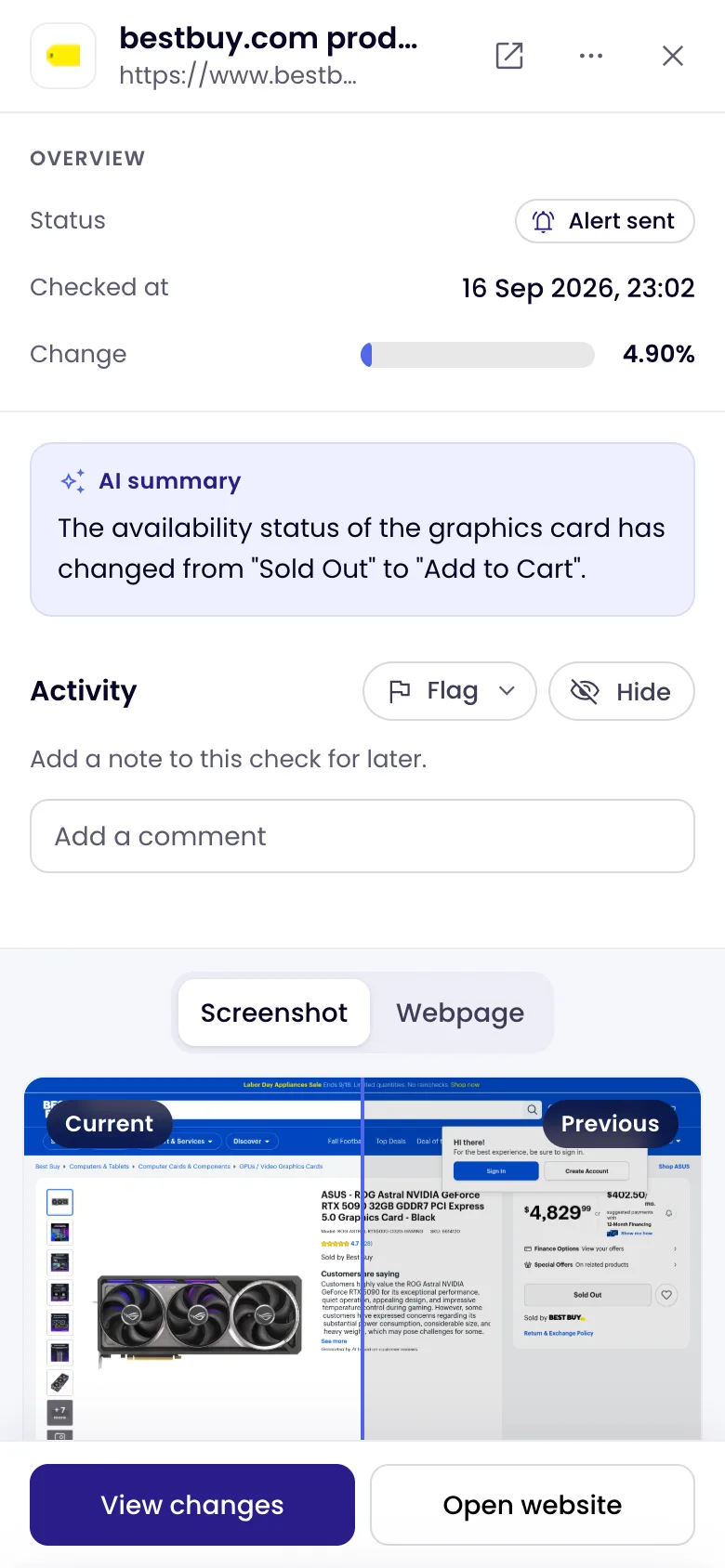
Pokémon Center doesn’t publish a restock schedule, so a restock alert means someone, or something, watching the store for you. Free community feeds on Discord and Reddit post when a drop or the site’s queue goes live. For one exact product page, a category page or a local game store, a page monitor such as Monity (monity.ai) checks the page on a schedule you set and alerts you by phone push, Discord, Telegram or email. No alert gets you through the queue or buys for you.
When does Pokémon Center restock?
There is no published schedule. The Pokémon Company’s statement on trading card supply (Pokémon, 27 March 2025) says it will “continue to reprint impacted products to replenish stock at participating retailers, including Pokémon Center, as soon as possible”. It gives no dates or times.
The restock windows you see posted online are people’s notes on past drops. They help you guess, but a new set or a reprint can land at any hour, which is why collectors rely on alerts rather than a calendar.
How does the Pokémon Center queue affect restock alerts?
In the same statement Pokémon says: “Currently, Pokémon Center implements a virtual queue for certain products during periods of increased site traffic.” An alert can tell you that a product or the queue is live. It can’t hold a place for you: you join the queue yourself, in your own browser.
Pokémon Center’s help center has an article on its virtual queue. It refused our requests on 23 November 2026, as did the store’s terms of use, so we can’t confirm the current rules on refreshing, extra tabs or how many of an item you may buy. Read them before a drop, and check the limit shown on the product page.
Which Pokémon restock alert should you use?
Each kind of alert covers different stores. As shown on each service’s own site on 23 November 2026:
| Option | What it watches | Price | Fits |
|---|---|---|---|
| Community feeds: Discord servers, subreddits such as r/PokemonTCGRestocks | Whatever members or their bots post: queue openings, drops, store restocks | Usually free | Hyped Pokémon Center drops, where the news spreads fast |
| Restock Central | Amazon and Walmart. Its page lists Pokémon Center, Target, Best Buy and GameStop as “Not watched”. In a private beta with a waitlist. | Free (alerts 10 minutes after Priority); Priority $4.99 a month through Whop | Amazon and Walmart card restocks, posted to Discord |
| HotStock | A catalogue of products, Pokémon card boxes included, at stores it lists such as Pokémon Center, Walmart, Target and Best Buy | Free to sign up; a Premium subscription is sold in its app, with no price on its website | Products already in its catalogue, with alerts in its app |
| A page monitor (Monity) | Any public page you choose: one product, a category or search page, a local game store’s Pokémon page | Free plan: 3 monitors, a check every 3 hours at most. Faster checks on paid plans. | Pages no feed covers, and rules such as a price cap |
TrackaLacker is another tracker collectors mention. Its site refused our requests on 23 November, so we can’t tell you what it covers or costs today.
For a hyped Pokémon Center exclusive, start with a community feed: it costs nothing and people post the moment they see the queue. Add a page monitor for the stores and pages the feeds ignore.
How often should a restock monitor check the page?
A scheduled monitor only sees the page when it checks. If a product comes back and sells out between two checks, the monitor misses it. One check uses one credit, so speed decides the plan:
- Every 3 hours, free plan: plush, binders, older sets, a local shop’s pre-order page. The 100 monthly credits cover one page every 3 hours for about 12 days, or every 12 hours for a month.
- Every hour, Personal Small ($12 a month, $10 billed yearly, 1,000 credits): one page checked hourly uses about 720 credits a month.
- Every 15 minutes, Personal Medium ($35 a month, $25 billed yearly, 5,000 credits): one page uses about 2,880.
- Every 5 minutes, Personal Large ($70 a month, $50 billed yearly, 10,000 credits): one page uses about 8,640.
Five minutes is the fastest page check on a personal plan. For a release that sells out while the queue is still moving, even that can be too slow, and a free feed may beat it. Pause the monitor once you have your box so it stops using credits. All plans are on the pricing page.
Which stores can a page monitor read?
Some stores block automated visits. This is the share of Monity customers’ checks that loaded and read the page in the 14 days to 23 November 2026:
| Store | Checks that read the page |
|---|---|
| pokemoncenter.com | 98% |
| bestbuy.com | 100% |
| walmart.com | 97% |
| target.com | 56% (the rest were blocked or shown a captcha) |
Target is the weak one, so don’t count on a monitor there. When a store blocks a check, Monity reports it as blocked and doesn’t try to get past the block or the captcha (what happens when a site blocks Monity). For local game stores and any shop not in the table we have no numbers: open the first check’s screenshot and confirm it shows the product and its price before you rely on it.
How do you set up a Pokémon restock alert in Monity?
- Open the product at the store you’d buy from and copy the address. If the product isn’t listed yet, copy the store’s category or search page instead.
- Create a monitor with that address, or paste it into the assistant in the Monity phone app and say what you’re waiting for.
- Write the rule under “Notify me when” in your own words, for example “the Add to Cart button appears”, “a new Elite Trainer Box is listed on this page” or “it’s in stock and under $60”. A price cap keeps a marketplace seller asking double from setting off the alert.
- Pick where alerts go: push in the app, a Discord channel you share with friends, Telegram or email. Every channel is on every plan, the free one included.
Monity reads each change on the page against your rule and stays quiet about the rest. Every check keeps a screenshot with its time, so you can see what the page showed when an alert fired, or didn’t.