


A 503 Service Unavailable means the server is turning requests away for now, because it’s overloaded or under maintenance, and expects to be back. If you’re visiting the site, it isn’t your fault: wait a few minutes and reload, or look at the company’s status page. If it’s your site, the first question is whether the 503 was planned.
Planned maintenance or an outage?
RFC 9110 describes a 503 as the server being “currently unable to handle the request due to a temporary overload or scheduled maintenance, which will likely be alleviated after some delay”. A planned 503 usually announces itself: a maintenance page, and a Retry-After header saying when to come back. This is what WordPress sends during an update:
HTTP/1.1 503 Service Unavailable
Retry-After: 600

Briefly unavailable for scheduled maintenance. Check back in a minute.
An unplanned 503 is usually a bare error page from a web server or load balancer, with no Retry-After. To see the status and headers yourself, run curl -sI https://example.com/, or try Monity’s redirect checker, which asks from outside your network.
Who sent the 503?
| What you see | Who sent it | Where to look |
|---|---|---|
“Briefly unavailable for scheduled maintenance” with Retry-After: 600 |
WordPress, in the middle of an update | The .maintenance file (next section) |
| A 503 page with “cloudflare” in its HTML | Cloudflare’s own data center, according to Cloudflare; without it, your origin sent the page | Cloudflare’s status page, then your server |
| 503s from an AWS Application Load Balancer | The load balancer: its target groups have no registered targets, or none ready (AWS) | Target health after the last deploy |
| 503s only under heavy traffic, from nginx | A rate limit: nginx’s limit_req rejects with 503 unless set otherwise |
limit_req_status in the nginx config |
| Your own app’s error page | The app shedding load: workers, memory or database connections ran out | CPU, memory and connection pools at that time |
WordPress stuck in maintenance mode
WordPress writes a .maintenance file to its root folder when an update starts and deletes it when the update ends. If the update is cut off, the file can stay. WordPress ignores it once it’s 10 minutes old, so a stuck message usually clears itself. If it doesn’t:
- Open the site’s files through your host’s file manager or SFTP.
- Delete
.maintenancefrom the folder that holdswp-adminandwp-includes. It starts with a dot, so turn on hidden files. - Go to Dashboard › Updates and run the update that didn’t finish.
If the 503 lasts longer than 10 minutes, the file isn’t the cause. A wp-content/maintenance.php file replaces WordPress’s message with its own page (wp_maintenance), and maintenance plugins, your host or a server limit can all answer with 503 too.
Taking a site down on purpose, without losing rankings
- Answer 503, not 200. Google may index whatever a page returns with a 2xx code (Google’s crawling docs), so a “down for maintenance” page that returns 200 can take your pages’ place in search.
- Add
Retry-After, as seconds or a date. - Keep it to hours. Google suggests 500, 503 or 429 to slow its crawlers for “a couple of hours, or 1-2 days” (reduce crawl rate). Indexed pages stay through a short outage, but URLs that keep returning server errors are eventually dropped.
- Tell people where to look. A status page can list the maintenance in advance and email subscribers.
- Pause your own monitoring. A maintenance window in Monity stops checks and alerts for the monitors it covers, so the planned 503 doesn’t page anyone.
When nobody planned it
An unplanned 503 is an outage. Look at what changed just before it: a deploy, a traffic spike, a slow query holding every worker. On a load balancer, check that targets are registered and healthy after the deploy. On nginx, if the 503s line up with busy minutes, it may be your own rate limit; set limit_req_status 429 so throttled clients and real outages look different in your logs.
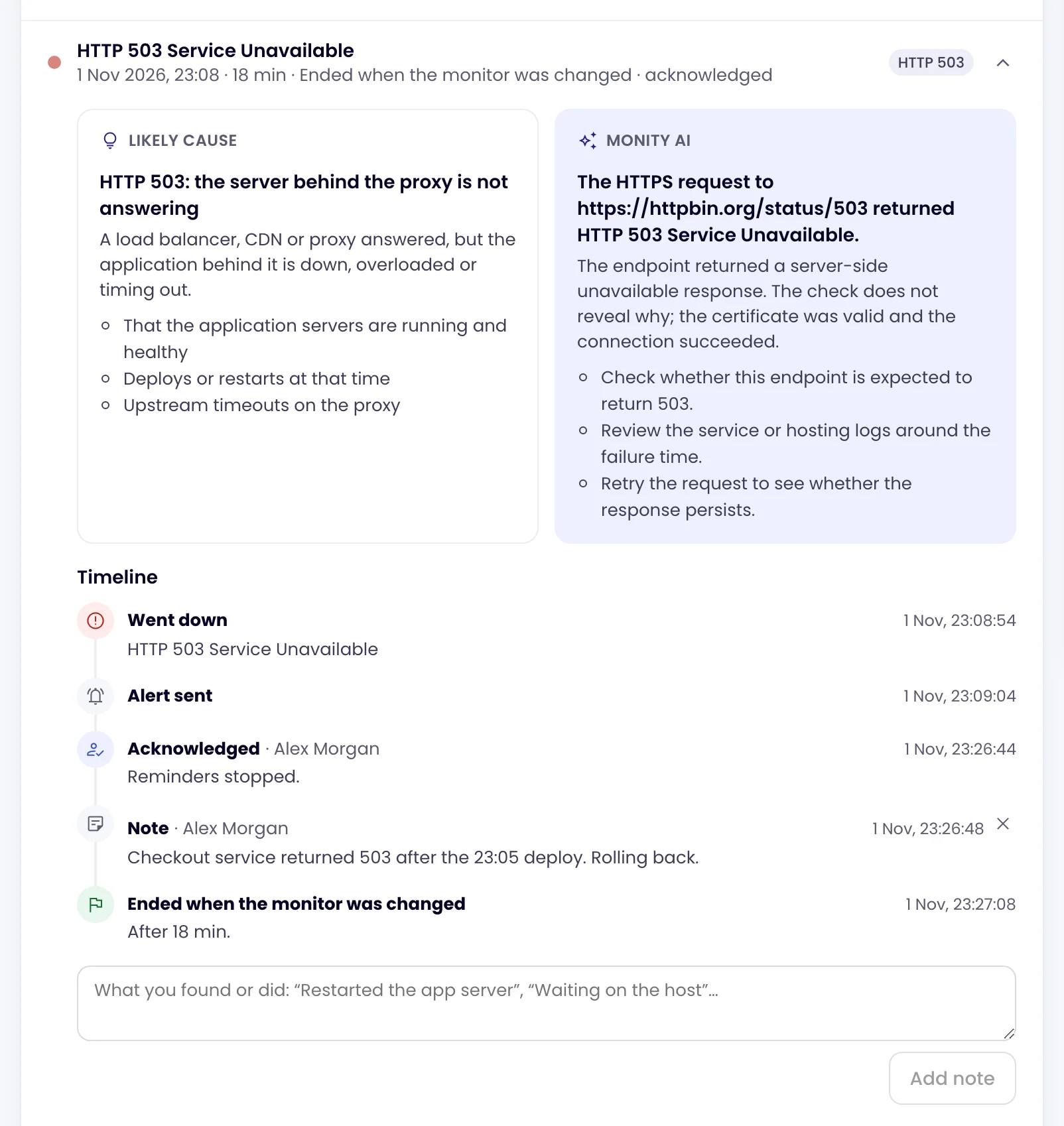
Monity’s uptime monitoring checks the site from outside every 30 seconds to every hour, depending on the plan, and confirms a failure with two more checks before it alerts. The incident keeps the status, headers and response of the failed check with a screenshot, so you can tell your own maintenance page from a load balancer’s error.
More on server errors: all HTTP status codes, 502 Bad Gateway and 429 Too Many Requests.