


API monitoring means calling your endpoints on a schedule from outside your network and alerting when one fails: a wrong status code, a slow answer, a missing field in the JSON or an expired certificate. A 200 alone proves little, so check a value in the body too. In Monity (monity.ai), a Website uptime monitor sends any method with your headers and body, checks JSON values and headers in the answer, and runs every 30 seconds to every hour, depending on the plan.
What should an API monitor check?
| Check | What it catches | Example rule |
|---|---|---|
| Status code | Server errors, broken auth, a removed route | 200-299. On a private endpoint called without a token, 401 |
| Response time | A slow database, a cold start, a timeout | Alert when 3 checks in a row take over 2,000 ms; give up after 10 seconds |
| JSON body | A 200 that carries an error or no data | $.status equals ok; $.data[0].id exists |
| Headers | A proxy’s HTML error page, a wrong version | Content-Type contains application/json |
| Certificate and domain | Expiry, a missing intermediate | Warn 14 days before the certificate expires, 30 days before the domain |
| DNS | A record changed or deleted | The CNAME of api.example.com includes your load balancer’s host name |
The 401 check catches a private endpoint that became public. RFC 9110 defines 401 as a request that “lacks valid authentication credentials”, so a 200 there means anyone can read it. Give it a monitor of its own with no token, on an endpoint your other monitors don’t call: a workspace has one Website monitor per address.
Which endpoints should you monitor first?
- A health endpoint that checks what the API depends on (database, queue, cache) and reports each one in JSON. One that always answers 200 only proves the web server is up.
- The endpoint customers call most, with a read-only key from a test account.
- Sign-in: the token endpoint, called with a test client’s credentials, checking that the answer has
$.access_token. Every 5 or 15 minutes is enough, and stays clear of any monthly limit your identity provider puts on issued tokens. - Writes, carefully. A check every minute is 43,200 calls a month, so never create real orders or send real emails. Use a test account, a dry-run option, or an idempotent call such as a PUT on the same record.
Example: an API health check every minute
Say GET https://api.example.com/health answers:
HTTP/1.1 200 OK
Content-Type: application/json

{"status": "ok", "version": "2026.11.3", "checks": {"database": "ok", "queue": "ok"}, "queue_depth": 12}
Set up a Website uptime monitor in Monity like this:
- Open Uptime, click New monitor, choose Website and enter
https://api.example.com/health. - In Request options, keep the method GET and add the header
Authorization: Bearer <key>with a read-only key. POST, PUT, PATCH, DELETE, HEAD and OPTIONS work too, with a body for POST, PUT and PATCH. - Under When it counts as down, set Good status codes to
200-299and add checks on the answer:$.statusequalsok,$.checks.databaseequalsok,$.queue_depthis less than1000, and the headerContent-Typecontainsapplication/json. You can add up to 10, and all must pass. - Turn on Alert when responses are slow at 2,000 ms and set Give up after to 10 seconds.
- Choose every minute, click Test now to see one real check, then Create monitor.
When the database check fails, the incident reads $.checks.database is “degraded”, expected “ok”.
What happens when a check fails
Before it alerts, Monity checks again 3 and 6 seconds later, and before a network error counts it makes sure its own connection works, so one dropped request doesn’t wake anyone. The incident shows the status, where the time went (DNS, connect, TLS, first byte), the response headers, the start of the answer and a likely cause. You can alert at once or only after 1 to 60 minutes down, send reminders until someone acknowledges, and get a recovery alert when it’s back.
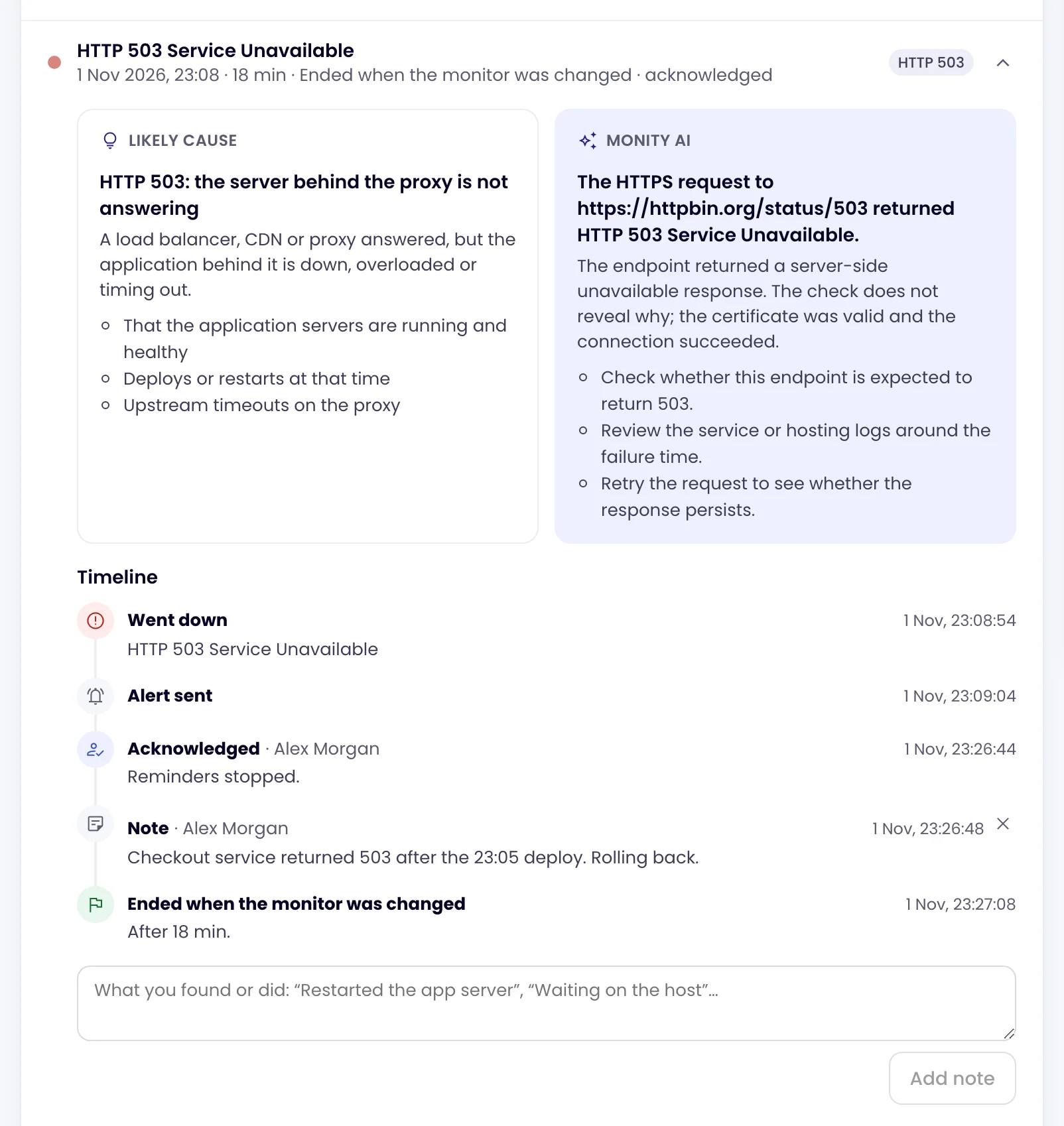
Alerts go to email, Slack, Microsoft Teams, Discord, Telegram, Google Sheets, a webhook or the phone app. The webhook is signed and sends events such as uptime.down, uptime.up and uptime.slow, which you can forward to an on-call tool: Monity has no on-call schedules of its own. Monitors can be created from code through the REST API (/api/v1/uptime), and a public status page can show them to your customers. Certificate expiry warnings arrive the same way; SSL certificate expiry monitoring covers what to set.
How to monitor a multi-step API flow
An uptime monitor makes one request with fixed headers. It can’t sign in, take a token from the answer and use it in a second call, so give monitors a long-lived, read-only API key, not a token that expires in an hour.
For a flow through your app (sign up, sign in, create a record, see it listed), use a browser test. It runs the steps in a Firefox-based browser in Monity’s cloud, so it calls your API the way your front end does. Steps are written without code, passwords go into encrypted secrets, and a step can type a two-factor code. Run it on a schedule, from every 5 minutes to once a day as your plan allows, and after each deploy from a GitHub Actions workflow. A run uses 1 credit per started minute in the browser.
What Monity doesn’t do for APIs
- Private APIs. Checks come from Monity’s servers on the internet, and private network addresses are refused. For an internal API, run a small job inside your network that calls the endpoint and then a heartbeat link on success, as in cron job monitoring. If you already run Prometheus, its blackbox_exporter probes internal endpoints for free.
- Where your users are. Response times are measured from Monity’s servers, not from your users’ countries. They tell you the API slowed down, not how long a user in Sydney waits.
- Scripted chains and contract tests. No request chaining, no OpenAPI schema validation, and JSON paths are simple (
$.data[0].id, no filters). Tools that script API checks in code do this; Monity vs Checkly compares one. - Tracing. Monity sees your API from outside. Errors inside a request, traffic per endpoint and traces need an APM tool.
Each endpoint is one monitor. The free plan has 3, checked every 5 minutes at most. Personal Small checks every minute, and 20 endpoints use about 880 of its 1,000 credits a month ($12 a month, or $10 billed yearly). Business Small has 30 monitors, 5,000 credits and 3 seats ($35 a month, or $25 billed yearly). Prices as of 23 November 2026.