


A website QA checklist has two halves: the checks a person runs once before launch, and the checks that need to run again after every deploy, because that is when a staging noindex, a broken checkout button or a heavy hero image slips back in. With Monity (monity.ai) you can run the one-off checks with free tools, then automate the repeat half with browser tests, uptime monitors and page monitors whose monitoring skills check SEO, speed, accessibility, links, certificates, cookies and scripts on every visit.
What to check by hand, and what to automate
| Area | Before launch, by a person | After every deploy, in Monity |
|---|---|---|
| Key flows (sign-up, login, forms, checkout) | Edge cases, copy, emails, refunds. | Browser tests that replay the steps on a schedule or after each deploy. |
| SEO and indexing | Site structure, redirects map, Search Console set-up. | The SEO audit skill: robots meta tag and X-Robots-Tag, status, title, canonical, structured data, AI-crawler access. |
| Layout | Design review on real phones. | Visual monitoring: screenshots compared on every check, changed regions marked. |
| Links | Are outbound links the right ones? | The broken link checker skill: only newly broken links alert. |
| Speed | Profiling bundles and slow queries. | The Speed & Core Web Vitals skill: largest contentful paint, server response, page weight. |
| Accessibility | Keyboard, focus order, screen reader, meaningful alt text. | The Accessibility skill: axe-core, WCAG 2.1 or 2.2 AA. |
| Uptime, certificates, cookies, scripts | Privacy policy and firewall review. | Uptime monitors, SSL certificate & domain watch, Cookie & tracker watch, security signals and script watch. |
1. Forms, sign-in and checkout
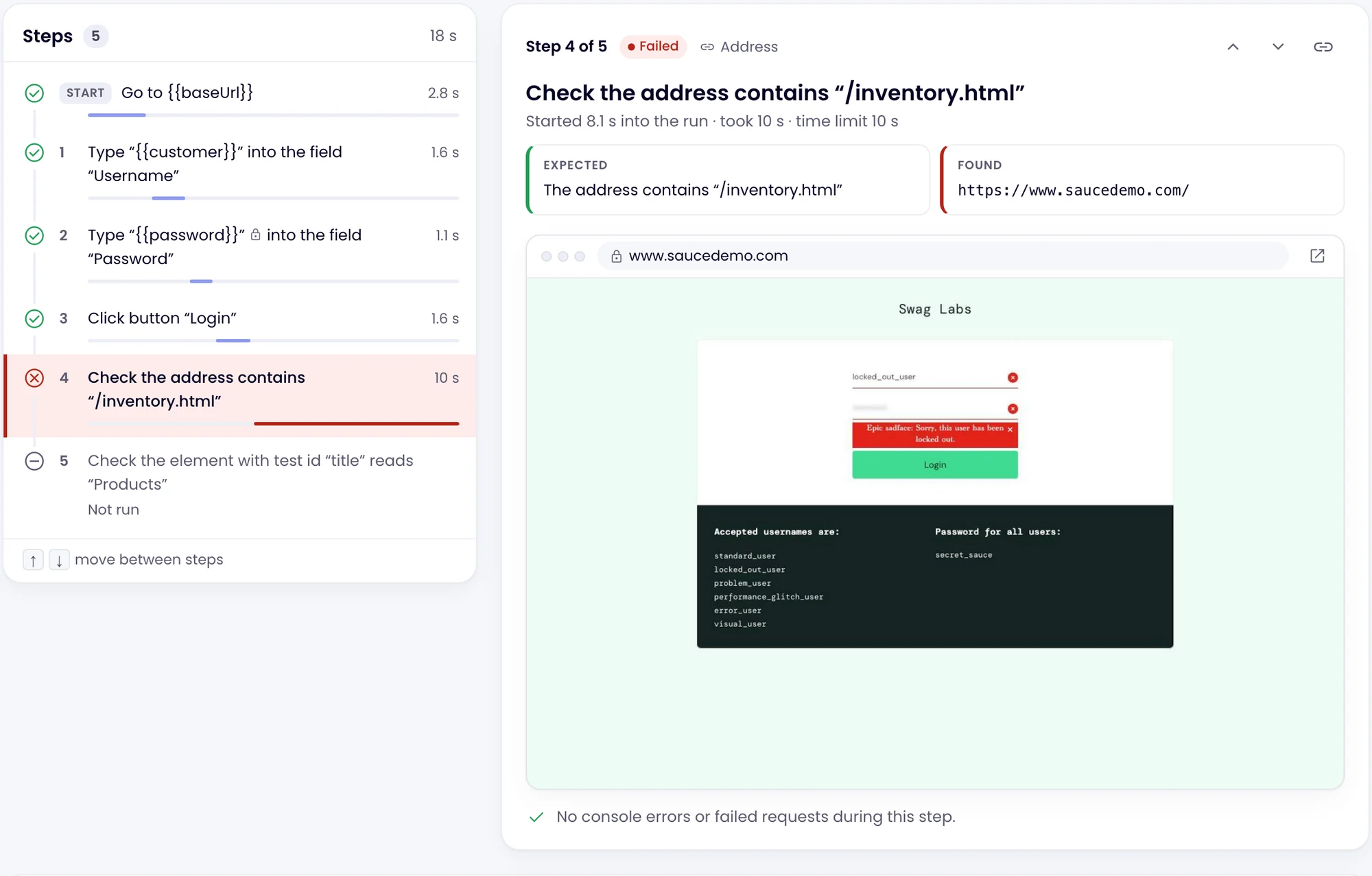
A page can answer 200 OK with a dead “Create account” button. Before launch, and after every front-end deploy, check:
- Contact and lead forms: valid and invalid input, the error messages, required fields, and that the submission reaches your inbox or CRM.
- Sign-up, sign-in and password reset: including two-factor codes, and that the session survives a reload.
- Search, filters and pagination: results load and the address updates.
- Cart and checkout: add a product, apply a discount code, get a shipping price, reach the payment step.
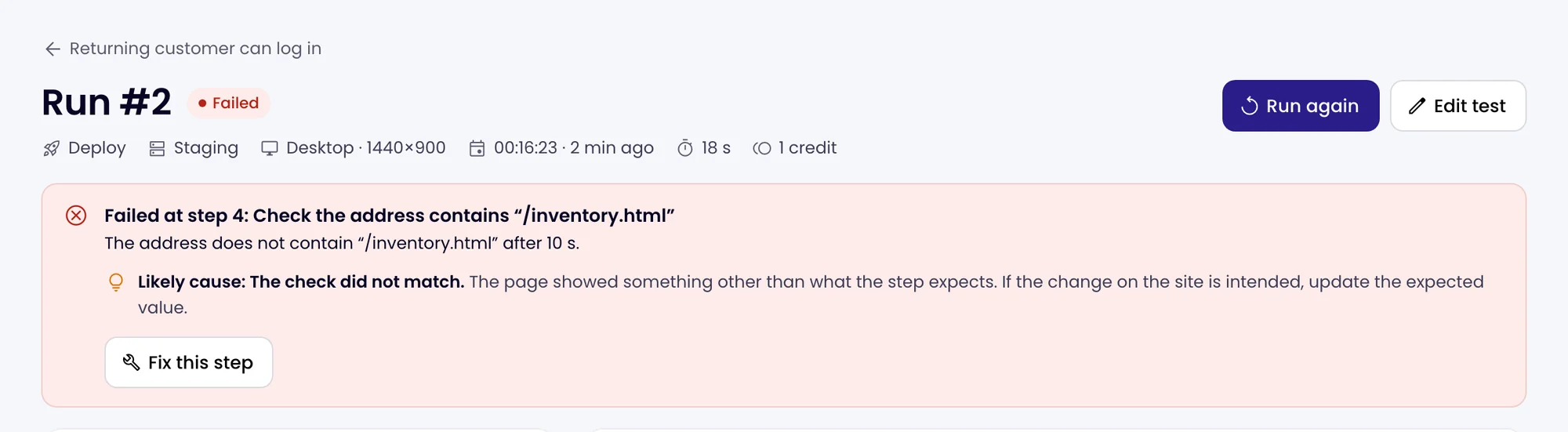
To automate it, write the flow as steps in a Monity browser test, or describe it and let the assistant draft it (write tests with AI). Tests take environments with variables, encrypted secrets and two-factor codes. They run on a schedule (from every 5 minutes to daily, no faster than your plan’s fastest page check) or from a deploy trigger URL, for example in a GitHub Actions workflow. Each run keeps a screenshot per step, the console messages and the failed requests. Tests run in a Firefox-based browser against public addresses, so a staging site has to be reachable from the internet.
2. SEO and indexing
Check that the staging site’s settings didn’t ship. Test a page with the free SEO audit and Meta Tag Checker:
- Indexing: neither the
<meta name="robots">tag nor theX-Robots-Tagheader saysnoindexon pages meant to rank. - Canonicals: each
<link rel="canonical">points to the live HTTPS address, not a staging host. - Titles and descriptions: one H1, a title of about 60 characters or fewer, a description of about 155, and share cards (the free Social Share Preview).
robots.txt, sitemap, structured data:robots.txtdoesn’t block the crawlers you want, and the JSON-LD is valid.
To automate it, turn on the SEO audit skill on your key pages. It compares the indexing rules, status, title, canonical and structured data with the previous check, and a change alerts once it is still there on the next check.
3. Links, redirects and layout
- Links: the free Broken Link Checker tests every link on a page and on up to five of its internal pages. For ongoing checks, the broken link checker skill alerts only on links that newly broke, external ones included.
- Redirects: the free Redirect Checker shows each hop, so you can see that
http://and the non-canonical host reach the live page in one permanent (301) redirect. - Layout: a CSS change to a shared component can break pages nobody opened in review. Visual monitoring compares the full page, a screen-height or an area you draw, and marks what changed. For your own sites, see website QA and defacement monitoring.
4. Speed and Core Web Vitals
Google’s Core Web Vitals guidance asks for largest contentful paint (LCP) within the first 2.5 seconds of loading, interaction to next paint (INP) under 200 milliseconds, and cumulative layout shift (CLS) under 0.1.
- Get a baseline with the free Website Speed Test: LCP, first paint, server response, page weight and the slowest files, next to Google’s real-user data when the page has it.
- Then turn on the Speed & Core Web Vitals skill. It measures LCP, server response and page weight on every check, logged-in pages included, and alerts once when LCP stays above 2.5 seconds for two checks in a row.
- Know what it can’t see: Monity doesn’t measure layout shift, and INP needs real visitors clicking. Its numbers are lab data from its own browser, not the field data Google ranks on.
5. Accessibility (WCAG 2.1 and 2.2 AA)
- By hand: tab through menus, dialogs and forms without a mouse. Check the visible focus, the tab order, that nothing traps the keyboard, and that alt text describes the image.
- Automated: test a page with the free Accessibility Checker, then turn on the Accessibility skill to catch new contrast, label or button-name failures after a release. It runs axe-core in the browser that loaded the page, frames and cookie banners included. It finds issues; it doesn’t certify compliance.
For many consumer sites in the EU, accessibility has been a legal requirement since 28 June 2025 under the European Accessibility Act.
6. Uptime, certificates, cookies and scripts
- Uptime: uptime monitors on the homepage, login and API health routes, checked every 30 seconds to every hour by plan (every 5 minutes on the free plan). A failure is checked again 3 and 6 seconds later before it alerts.
- Certificates and domains: SSL certificate & domain watch alerts 14 days before a certificate expires, 30 days before the domain does, and the day the nameservers change.
- Cookies before consent: the free Cookie Scanner loads your site in a fresh browser that never touches the banner. Cookie & tracker watch then alerts when a new tracker loads before consent or the consent platform goes missing.
- Scripts and headers: security signals and script & connection watch alert on a script from a new domain or a removed header such as
Strict-Transport-Security(and help with PCI DSS 6.4.3 and 11.6.1 on payment pages).
What it costs
Monitoring skills use no extra credits: one check of a page is one credit, whatever skills run on it. Uptime monitors use 1 credit per 1,000 checks. A browser test run uses 1 credit per started minute plus 1 per AI check, and a run Monity couldn’t complete is free.
- Free plan: 3 monitors and 100 credits a month, page checks every 3 hours at most.
- 15 key pages checked twice a day: about 900 credits a month, within Personal Small (20 monitors, 1,000 credits, $10 a month billed yearly). For a team, Business Small has 5,000 credits and 3 seats for $25 a month billed yearly. See pricing.
What automated QA doesn’t do
- It isn’t real-user monitoring. Monity checks your pages from outside, in its own browser, and adds nothing to them.
- It doesn’t replace unit tests. Browser tests check flows on public addresses. Keep unit and component tests in your CI.
- A person still owns usability and copy. Automated checks catch technical regressions; someone still has to judge the design, the keyboard experience and whether the words are right.