
PCI DSS 6.4.3 and 11.6.1 script monitoring
Monity loads your payment pages in a real browser, lists every script they run and every place they send data, and alerts you when a new script source, a changed third-party script or a new destination appears.
- Paid plans and the Business trial
- Real browser, real checkout
- Evidence, not a certificate

What 6.4.3 asks for
An inventory of every script your payment page runs, kept for you.
PCI DSS 4.0 requirement 6.4.3 asks merchants to know every script that runs on a payment page in the customer’s browser: confirm each one is authorised, assure its integrity, and keep an inventory with a reason for each. Monity loads the page in a real browser on every check and lists them all, including scripts a tag manager injects after load and ones its own blocker stopped, with a content hash, subresource integrity (SRI) and the vendor behind each.
- Every script: address, first or third party, vendor, size, SHA-256, SRI
- Every place the page sends data: fetch, XHR, beacons, websockets, form posts
- Approve the origins you have reviewed; they stay listed and never alert
What 11.6.1 asks for
An alert when the scripts or security headers change.
Requirement 11.6.1 asks for a mechanism that alerts on unauthorised changes to the scripts and security-impacting HTTP headers of payment pages, as the browser receives them, at least weekly or as often as your risk analysis says. That is what a Monity task does, on the schedule you set: new script sources, a third-party script whose content changed, data sent somewhere new, a form or card frame pointing somewhere else, SRI removed, a security header changed.
- Card skimmers usually arrive as one new script or one edited one
- A changed script must hold on two checks, so per-visit scripts stay quiet
- The first three checks learn the page; only suspicious inline code alerts during them
Reaches the real payment page
It gets to the checkout the way a shopper does.
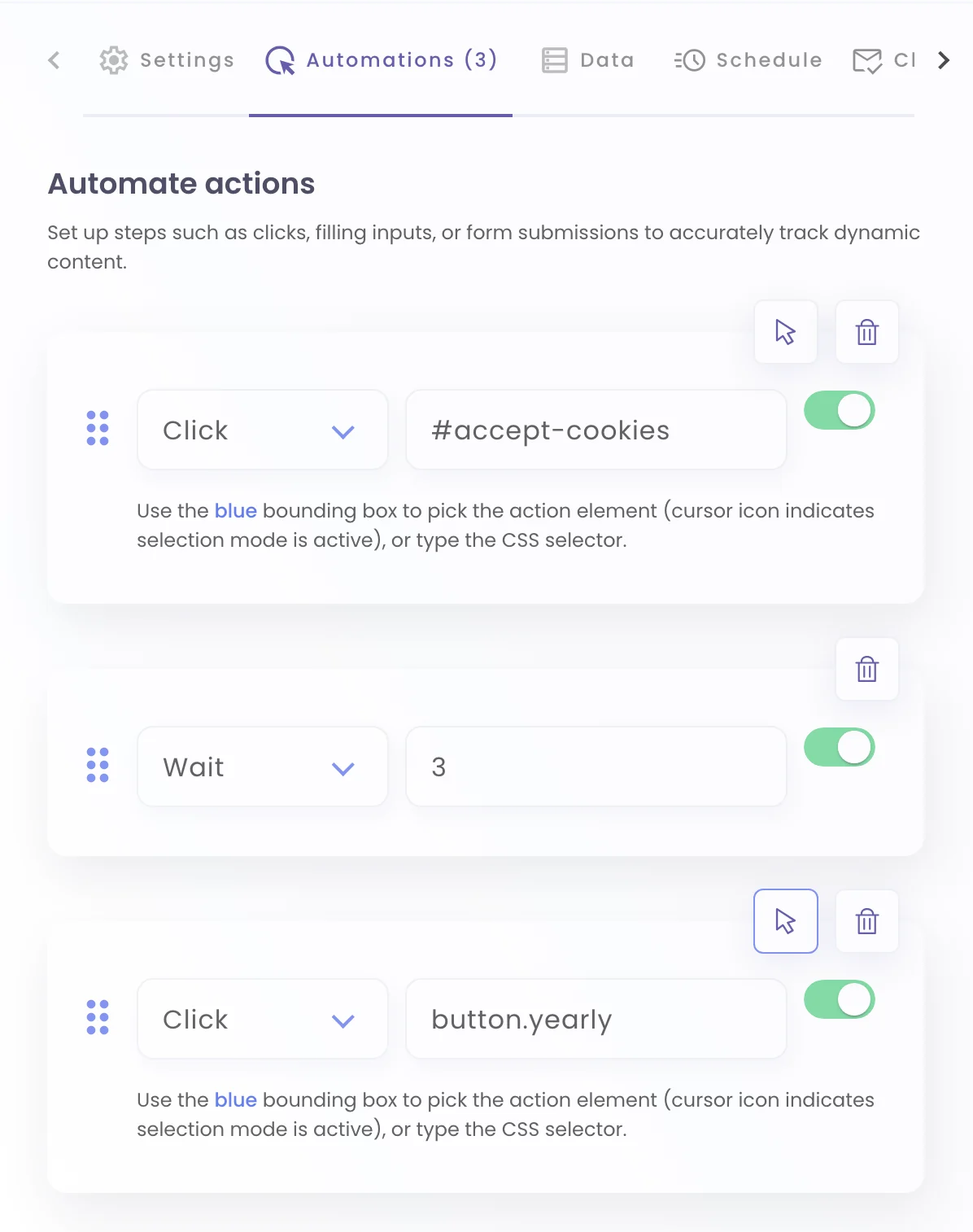
A payment page usually sits behind a basket. A Monity task can run steps before each check (add a product, open the basket, go to checkout) or sign in with a saved session, then inventory the page that takes the card: the scripts a shopper’s browser runs there, the frame that holds the card form, and where the form posts.
- Click, type, select, wait and scroll steps before every check
- Suspicious inline code is reported from the very first check
Alert rules
Seven rules, all on from the start.
“New” means a site the page has not used in the last 30 days, so ad and A/B scripts that come and go do not alert every time they return. Your own domains and the origins you approve never alert, and your own scripts changing with each deploy only alert if you ask.
Script & connection watch
Paid plans| Rule | New tasks | Default | What it catches |
|---|---|---|---|
| New script source | On | A site not seen in 30 days | The page runs a script from a site it has not used in the last 30 days, the way most card skimmers arrive. Approved origins and your own domains never alert. |
| Third-party script content changed | On | Confirmed on 2 checks | A third-party script serves different content at the same address, and the change held on two checks in a row. Scripts generated per visit never alert; your own only if you ask. |
| Data sent to a new destination | On | A site not seen in 30 days | Fetch, XHR, beacons, websockets, form posts or data-carrying pixels to a third-party site the page has not sent anything to in 30 days. |
| Suspicious inline script | On | Once, while it stays | Inline code that decodes itself at run time, is packed or obfuscated, hides a script address, or reads card fields with a way to send them out. |
| Subresource integrity removed | On | Any removal | An external script that had an integrity hash is now loaded without one. |
| Form or payment frame points somewhere new | On | Any change | A form submits to a new third-party site, the card form is framed by a different site, or card fields left the payment provider’s frame. |
| Security headers changed | On | Any change | Content-Security-Policy, HSTS, X-Frame-Options, Referrer-Policy, Permissions-Policy or CSP report-only added, removed or changed. |
This is evidence and early warning from a real browser visit, not a compliance certificate. Your QSA decides what satisfies 6.4.3 and 11.6.1 for your environment; the inventory, the approvals you record and the dated alerts are what you show them.
Examples
Ask for it in a sentence. Hear about the script before the bank does.
Tell the assistant what to watch, or switch the skill on in a task’s settings. Alerts go to the channels you turn on for the task.
-
 Watch the Northwind checkout for Magecart-style script changes
New script source: 1 — https://cdn.js-assets.example. Added through the tag manager by a compromised marketing account; removed within the hour.
Watch the Northwind checkout for Magecart-style script changes
New script source: 1 — https://cdn.js-assets.example. Added through the tag manager by a compromised marketing account; removed within the hour. Slack · #security
-
Tell me if the payment form on our checkout starts posting anywhere new
Form or payment frame points somewhere new: 1 — A form now submits to https://collect.example-pay.net. A critical rule: where card details go is the whole point of the page.
 Microsoft Teams · Security · Payments
-
Alert me when a third-party script on coastalcrm.com/billing changes
Third-party script content changed: 1 — Script changed: https://cdn.chat-vendor.example/widget.js. A vendor release, confirmed with the vendor and noted against the inventory.
 Email · security@coastalcrm.com
-
Watch the security headers on our payment page
Security headers changed: Content-Security-Policy "script-src 'self' https://js.stripe.com" → (none). A CDN configuration change dropped the policy; the webhook fed the SIEM.
 Webhook · SIEM
Coastal CRM and Northwind are example companies; the hosts are made up.
Free tools
Scan a payment page now, then watch it.
The free scanners look at a page once. Monitoring keeps the inventory on every check and alerts you when it changes.
FAQ
Questions about PCI DSS script monitoring
What do PCI DSS 6.4.3 and 11.6.1 require?
Does Monity make us PCI compliant?
We file SAQ A. Does this still matter?
How does it avoid false alarms?
How often should the checkout be checked?
Which plans include it?
Know every script on your checkout, and every change to it.
Add the Script & connection watch to your payment pages and Monity keeps the inventory and alerts you when it changes.
- 7-day Business trial, no card
- Every alert channel on every plan
- Webhooks for your SIEM