


To check an SSL certificate, click the padlock or site-information icon in your browser, run openssl s_client against the server, or paste the domain into an online checker. Each shows when the certificate expires, which host names it covers and who issued it, but only as of today. For SSL certificate expiry monitoring, Monity (monity.ai) reads the certificate on every uptime check, warns you 14 days before it expires and 30 days before the domain does, and alerts when a check finds it expired, issued for another name or missing its intermediate.
What to look at in an SSL certificate
- Expiry date (“Valid to”, or
notAfterin OpenSSL): the day browsers start refusing the site. - Names (the Subject Alternative Name list): every host name the certificate covers.
example.comandwww.example.comare two names. A wildcard such as*.example.comcovers the second but not the first. - Issuer: the certificate authority, such as Let’s Encrypt or Google Trust Services. A change you didn’t make is worth a look.
- Chain: the intermediate certificate the server sends with its own, which links it to a root the client trusts.
How to check an SSL certificate in the browser
Click the icon to the left of the address, open the connection details, then the certificate. Chrome, Firefox, Safari and Edge all show the issuer, the validity dates and the names, though the menu wording changes between versions.
The browser is a poor test of the chain. Mozilla calls a missing intermediate “one of the most common server configuration problems”, and Firefox downloads intermediates in advance to work around it (Mozilla, 13 November 2020). So a site can open in your browser while curl, a phone app or a partner’s API client refuses it. Test the chain with OpenSSL or a checker.
How to check an SSL certificate with OpenSSL
This prints who the certificate is for, who issued it, and its dates. The echo closes the connection, so the command returns instead of waiting for input:
echo | openssl s_client -connect example.com:443 -servername example.com 2>/dev/null \
  | openssl x509 -noout -subject -issuer -dates
For monity.ai on 23 November 2026 it printed:
subject=CN = monity.ai
issuer=C = US, O = Google Trust Services, CN = WE1
notBefore=Oct 19 16:24:56 2026 GMT
notAfter=Jan 17 17:22:41 2027 GMT
-servername sends the host name (SNI), so a server that hosts many sites returns the right certificate. OpenSSL 1.1.1 and later send the -connect name by default (openssl-s_client). Three more checks:
- The names: end the command with
openssl x509 -noout -ext subjectAltName. - Expiry in a script:
openssl x509 -noout -checkend 1209600exits with 1 if the certificate expires within 14 days (1,209,600 seconds), and 0 if it doesn’t. - The chain and the name together:
echo | openssl s_client -connect example.com:443 -servername example.com -verify_hostname example.com 2>/dev/null | grep "Verify return code"prints0 (ok)when both check out, or one of the codes below.
These are the failures you will meet, as OpenSSL 3.0 and curl reported them for badssl.com’s test sites on 23 November 2026:
| Problem | OpenSSL’s verify return code | curl’s error |
|---|---|---|
| Expired | 10 (certificate has expired) | certificate has expired |
| Name not covered | 62 (hostname mismatch) | no alternative certificate subject name matches target hostname |
| Intermediate missing | 21 (unable to verify the first certificate) | unable to get local issuer certificate |
| Self-signed | 18 (self-signed certificate) | self-signed certificate |
On a Mac, /usr/bin/openssl is LibreSSL (3.3.6 on our test machine), which has no -ext or -verify_hostname. Use -text and look for “Subject Alternative Name”, or install OpenSSL.
How to check an SSL certificate online: SSL Labs and other checkers
Qualys’s SSL Server Test grades a public server from A+ to F on protocol support, key exchange and cipher strength. It gives T when the certificate isn’t trusted and M when its name doesn’t match (rating guide, version 2009r of 16 May 2025). Use it after you change a server’s TLS settings. It tests once; it doesn’t watch.
For a quick answer on several sites, Monity’s free SSL Certificate Checker shows the expiry date, the chain, TLS versions and HSTS, plus the domain’s own expiry, for up to 10 sites at once, with no sign-up.
Why auto-renewed certificates still expire
Most certificates now renew by themselves, so the ones that lapse are the ones whose renewal broke and nobody noticed:
- Renewal fails quietly. Let’s Encrypt’s HTTP-01 check “can only be done on port 80”, so a new firewall rule, a CDN or a redirect can stop renewals (challenge types). DNS-01 depends on DNS API credentials, which get rotated. Let’s Encrypt tells clients to retry a failed renewal rather than treat it as fatal (integration guide), so the failure often shows only in a log.
- Nobody gets a reminder. Let’s Encrypt stopped sending expiry emails on 4 June 2025 (announcement). A bought certificate’s reminders go to whoever bought it, who may have left.
- The chain is incomplete after someone installs a new certificate without its intermediate.
- A new host name isn’t covered: a subdomain, or www, added after the certificate was issued.
- The domain expires. The site, its email and its certificate renewals stop with it.
Shorter lifetimes leave less time to notice. Since 15 March 2026 a public certificate can last at most 200 days, and from 15 March 2027 at most 100 (CA/Browser Forum ballot SC-081), so one installed by hand now needs replacing about twice a year. Let’s Encrypt’s default becomes 64 days on 10 February 2027, and its announcement asks subscribers to “add alerting for renewal failures”. Our guide to 64-day and 100-day certificates lists when each renewal tool renews.
How to monitor SSL certificate expiry with Monity
An uptime monitor for each site
A Website uptime monitor reads the certificate on every check, so one monitor watches both downtime and expiry.
- Open Uptime, click New monitor, choose Website and enter the https address.
- Choose how often to check. Hourly is enough for the certificate and uses about 1 credit a month. A shorter interval also tells you when the site goes down: every 5 minutes (the free plan’s fastest) uses about 9 credits a month, every minute about 44.
- Keep the certificate warning at 14 days, or choose 3, 7 or 30. Keep the domain registration warning at 30 days, or choose 7, 14 or 60.
- Choose where alerts go: email, Slack, Microsoft Teams, Discord, Telegram, Google Sheets, a webhook or the phone app. Click Create monitor.
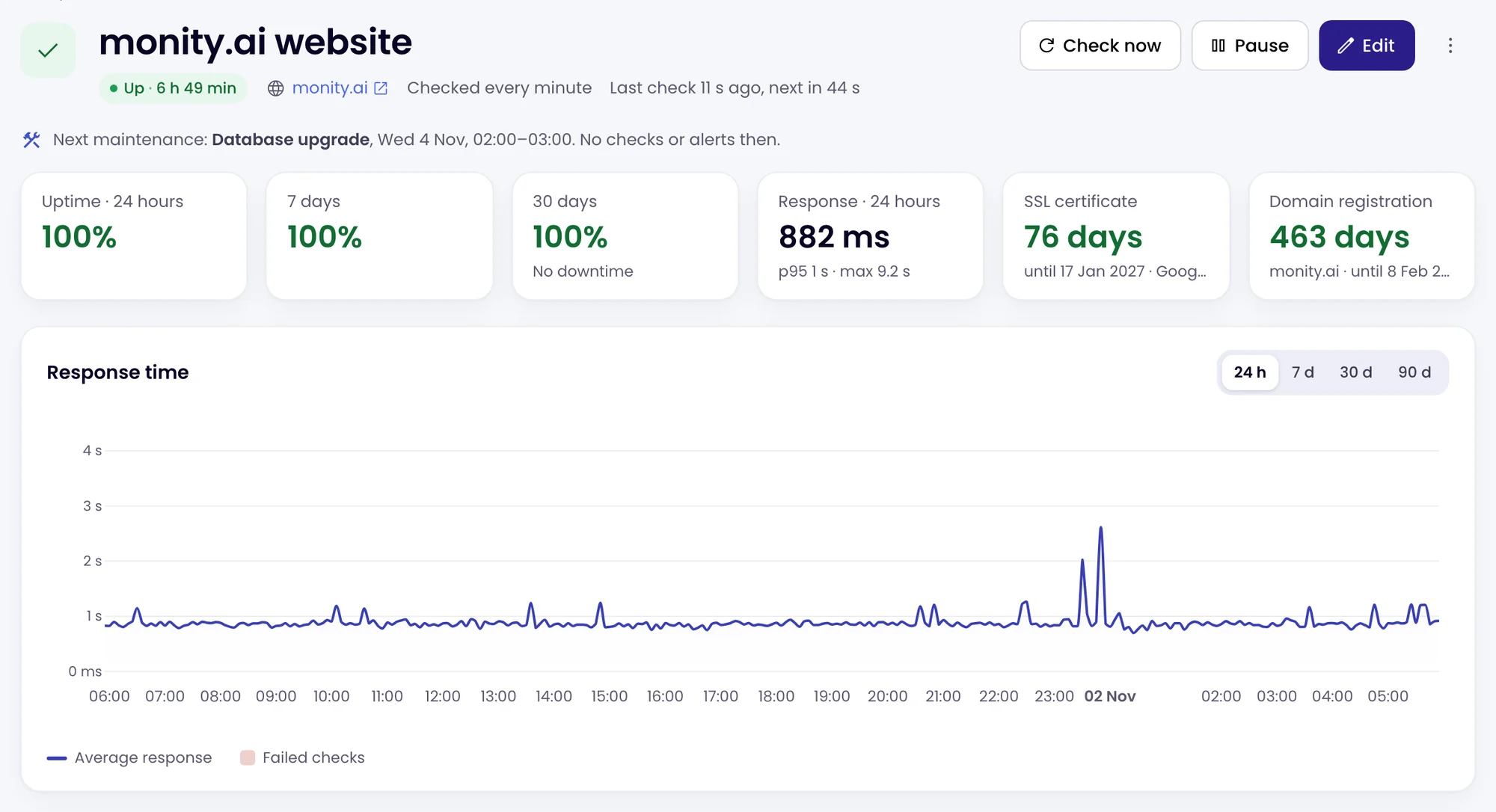
If a check finds the certificate expired, untrusted, issued for another host name or sent without its intermediate, the monitor fails. Monity checks again 3 and 6 seconds later, then alerts with the cause in words, such as “The SSL certificate is for a different domain” or “The SSL certificate chain is incomplete”. The expiry warning goes once per certificate, so a renewed one gets its own. The domain’s registration date is looked up once a day; some registries, such as .de, don’t publish it.
The SSL certificate & domain watch on a page monitor
If you already watch a page with a Monity page monitor, switch on its SSL certificate & domain watch. Its warning can be set from 1 to 90 days before expiry. It also alerts when the certificate authority changes, when the nameservers change and when the domain is suspended, at no extra credits.
A heartbeat on the renewal job
An expiry warning comes weeks after renewal first failed. To hear the same day, have the renewal job check in with a heartbeat monitor. Certbot’s documentation says certbot renew exits with status 1 “only if a renewal attempt failed”, so this line checks in after good runs only:
0 0,12 * * * certbot renew -q && curl -fsS -m 10 --retry 3 https://api.monity.ai/uptime/heartbeat/YOUR_TOKENSet the monitor to expect a heartbeat every 12 hours. Most Certbot installs already schedule renewal, though: systemctl list-timers | grep certbot shows a timer, or look in /etc/cron.d. Then add the call to that job instead, as an ExecStartPost= line for a timer (see cron job monitoring), and expect a heartbeat every 24 hours, since packaged schedules often start at a random time.
What Monity doesn’t do
- It doesn’t renew or install certificates.
- Uptime monitors read the certificate a website serves over HTTPS. A certificate on a mail server or another TLS port needs its own check, such as the
opensslcommand in the FAQ below. - It checks public addresses only. For an internal site, run the
-checkendcommand from a cron job inside your network and call a heartbeat link when it passes. - It doesn’t grade your TLS configuration. SSL Labs does that, for free.
Each site is one monitor, so the number of sites sets the plan: 3 on the free plan, 20 on Personal Small ($12 a month, or $10 billed yearly), and 100 with 5 seats on Business Medium ($70 a month, or $50 billed yearly). Prices as of 23 November 2026.