Two dates early in 2027 shorten the life of certificates across the web. On 10 February, Let’s Encrypt’s default certificate goes from 90 days to 64. From 15 March, no certificate authority may issue a public certificate for more than 100 days. If your host looks after certificates for you, or you run a current ACME client, you have nothing to change. What breaks is renewal by the calendar: an old copy of acme.sh, a cron job that runs every two months, a certificate somebody installs by hand once a year. The warning most people rely on, 30 days before expiry, stops being useful too, because a healthy 64-day certificate is renewed with only 21 days left, so that warning goes off for every certificate, every time.
This guide lists when each common tool renews, as read from its own source or documentation on 20 November 2026, and what to set an expiry warning to. Where a host or a CDN issues and renews your certificates, confirm that for each site, set a warning anyway, and skip to the section on warnings. We make Monity, which does the warning part. It does not renew anything.
The dates
| Date | What changes | Set by |
|---|---|---|
| 15 March 2026, already in force | No public certificate may last more than 200 days | CA/Browser Forum |
| 10 February 2027 | Let’s Encrypt’s default certificate: 64 days | Let’s Encrypt |
| 15 March 2027 | The limit becomes 100 days, and a domain validation can be reused for 100 days at most | CA/Browser Forum |
| 11 May 2027 | The last 90-day Let’s Encrypt certificates are expected to expire | Let’s Encrypt |
| 16 February 2028 | Let’s Encrypt’s default certificate: 45 days | Let’s Encrypt |
| 15 March 2029 | The limit becomes 47 days | CA/Browser Forum |
Let’s Encrypt’s staging environment has issued 64-day certificates since 14 October 2026, so everything below can be tried before February.
When each tool renews
Let’s Encrypt asks clients to renew about two thirds of the way through a certificate’s life, or to ask the CA when to renew, which is called ARI. Two thirds of 64 days is day 43, with 21 days left. Two thirds of 45 days is day 30, with 15 left.
| Tool | Its rule | On a 64-day certificate | On a 45-day certificate |
|---|---|---|---|
| Certbot 4.1 and later | Asks the CA (ARI) | Around day 43 | Around day 30 |
| Certbot 4.0 | When a third of the lifetime is left | Day 43 | Day 30 |
| Certbot before 4.0 | 30 days before expiry | Day 34 | Day 15 |
| acme.sh 3.1.4 and later | Asks the CA (ARI), and never later than a day before expiry | Around day 43 | Around day 30 |
| acme.sh 3.1.3 | 30 days after issue, less a day | Day 29 | Day 29 |
| acme.sh 3.1.2 and earlier | 60 days after issue, less a day | Day 59, five days before expiry | Day 59, two weeks after expiry |
| win-acme | 55 days after issue, or when fewer than 7 valid days remain | Day 55 | Day 38 |
| Caddy | Asks the CA (ARI), otherwise when a third of the lifetime remains | Day 43 | Day 30 |
| cert-manager | Two thirds of the way through | Day 43 | Day 30 |
| Traefik | 30 days before expiry | Day 34 | Day 15 |
| dehydrated | 32 days before expiry | Day 32 | Day 13 |
| Plesk’s Let’s Encrypt extension | 30 days before expiry | Day 34 | Day 15 |
| Certify The Web | At 75% of the lifetime | Day 48 | Day 34 |
The tools that count back from the expiry date (Certbot before 4.0, Traefik, dehydrated, Plesk) will renew earlier than they need to, which is harmless. win-acme also follows ARI when the CA suggests an earlier day. cPanel’s AutoSSL renews Let’s Encrypt certificates within 29 days of expiry, according to cPanel’s support site, which is about day 35 on a 64-day certificate and day 16 on a 45-day one.
The risk is in the tools that count forward from the day of issue. acme.sh did that with a 60-day default in every release up to 3.1.2, the last of which came out on 29 November 2025. On a 64-day certificate it still works, with five days of slack where there used to be thirty. On a 45-day certificate it schedules the renewal for two weeks after the certificate has expired. Release 3.1.3, of 28 April 2026, changed the default to 30. DevOps Daily ran Certbot, acme.sh and lego against staging in October and measured the same day 59 for acme.sh 3.0.7.
Your own scripts belong in that group as well. Let’s Encrypt’s advice is to search cron jobs, wrapper scripts and runbooks for the numbers 83, 80 and 60.
The copy of acme.sh you forgot about
acme.sh is a shell script, so other software ships it inside. We checked one common case: nginx-proxy’s acme-companion, which gets certificates for Docker containers. Its setting ACME_RENEW_AFTER (DEFAULT_RENEW before v2.7.0) is “60 days by default”, and it hands that to acme.sh as --days 60. Every release before v2.8.2, of 17 July 2026, therefore renews a 64-day certificate on day 59, and carries an acme.sh that never compares the renewal date with the expiry date, so on a 45-day certificate it would renew too late. v2.8.2 bundles acme.sh 3.1.4, which takes the renewal window Let’s Encrypt suggests (ARI) and caps the renewal date by the expiry date. Setting ACME_RENEW_AFTER to 30 is safe for every lifetime in the table.
To find the copies, run acme.sh --version and certbot --version wherever certificates are issued, and read the release notes of any container image or appliance that issues its own. acme.sh --upgrade brings a standalone copy up to date.
Certificates you buy
A bought certificate has been limited to 200 days since March, and from 15 March 2027 it is limited to 100. What you pay for is a year of cover. The certificate inside it has to be reissued and installed again each time it runs out, which from March means at least four times a year. The domain check behind it can be reused for 100 days at most, so it has to be repeated about as often as the certificate. DigiCert, which sells these certificates, put it this way: “even the 2027 changes to 100-day certificates will make manual procedures untenable”.
An agency should look for this group first. It is the client whose certificate somebody uploads to a control panel every spring.
How renewal fails without anyone noticing
Two post-mortems from this year show two different ways.
ImprovMX, an email forwarding service, renews its certificates automatically. In April 2026 a credential that the renewal used was rotated incorrectly, and renewals began “failing silently”. The certificates expired at 23:08 UTC on 14 May. The first anyone knew was a customer’s report at 04:33 the next morning. ImprovMX had relied on an outside certificate monitoring service, and “the service gave us no warning”.
Lucidworks renewed one certificate by hand. Its monitoring raised a 30-day warning on 27 June 2026, which went to an internal channel and was not acted on. The certificate expired on 27 July at 17:56 UTC, and the platform’s web interface could not be reached for about an hour and a half.
Shorter certificates make each of these worse:
- Automation that worked last quarter can stop without telling you. A 90-day certificate renewed on day 60 gave you 30 days to notice. A 64-day one gives about 21, and a 45-day one 15.
- A warning has to reach a person who owns it. One set to 30 days, on a certificate that normally renews with 21 days left, fires every time, and people learn to ignore it.
- The service that warns you can fail as well, ours included. Send a test alert when you set a warning up, and keep a second signal that comes from the renewal job itself.
Set the warning below the normal renewal point
| Certificate lifetime | Normally renewed around | Days left at that moment | Warn at |
|---|---|---|---|
| 90 days | Day 60 | 30 | 14 days |
| 64 days | Day 43 | 21 | 14 days |
| 45 days | Day 30 | 15 | 7 days |
| 100 days, installed by hand | When someone does it | It depends on them | 30 days |
The last column is our suggestion. The rest follows from the renewal rules above. Let’s Encrypt stopped sending expiry emails on 4 June 2025, so nobody will warn you unless you arrange it.
For the second signal, Certbot’s documentation says certbot renew exits with status 1 only when a renewal attempt failed. A cron line can therefore report each good run and stay silent after a bad one:
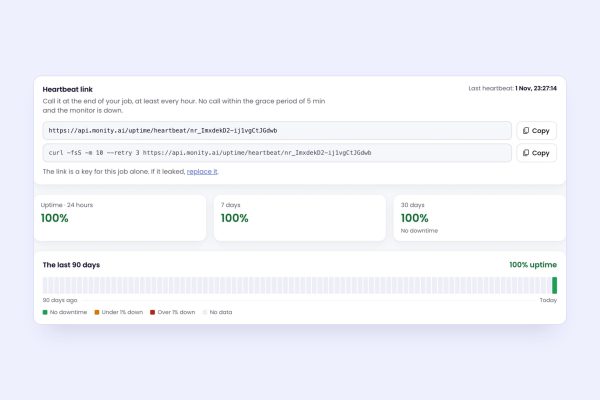
0 0,12 * * * certbot renew -q && curl -fsS -m 10 --retry 3 https://api.monity.ai/uptime/heartbeat/<your-token>A heartbeat monitor set to expect a call every 12 hours waits for it. When a renewal attempt fails, the call does not come and the monitor alerts within the day, which is weeks before an expiry warning would.
Forty client sites: the order of work
- List every host that serves HTTPS, subdomains and forgotten staging sites included.
- For each one, read who issued the certificate and when it expires. Our free SSL Certificate Checker takes ten domains at a time.
- Sort the hosts into three piles: the host renews it, an ACME client you run renews it, a person installs it.
- Start with the third pile. Move those sites to something that renews by itself where you can. Where you can’t, put the dates in a calendar that more than one person sees.
- In the second pile, compare each tool’s version with the table, upgrade, and watch one renewal happen against Let’s Encrypt’s staging environment.
- Put an expiry warning on every host, the first pile included, and send it to someone who will act on it.
Where Monity fits
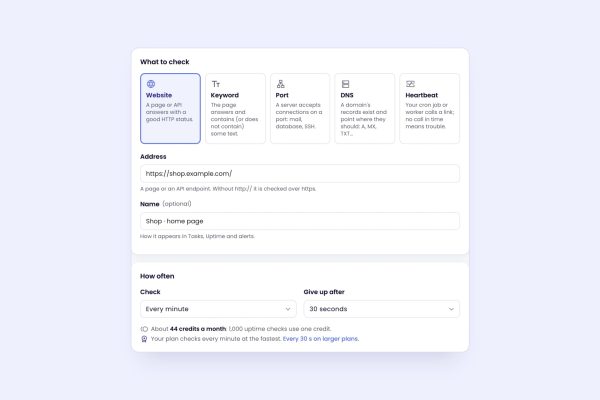
Two parts of Monity give the warning. A website or keyword uptime monitor warns 14 days before a site’s certificate expires, or 3, 7 or 30 days if you choose, and 30 days before the domain registration lapses. Checked every hour, it uses about 1 credit a month. The SSL certificate & domain watch is a skill you switch on for a page monitor. Its warning can be set anywhere from 1 to 90 days, and it also alerts when a certificate is invalid or issued for the wrong host, when the issuing authority changes, and when the nameservers change. Heartbeat monitors take the call from the renewal job.
Each site is one monitor. The free plan has 3. Personal Small has 20 for $10 a month billed yearly, or $12 monthly. For an agency, Business Medium has 100 monitors and 5 people for $50 a month billed yearly, or $70 monthly (pricing). Alerts go to email, Slack, Microsoft Teams, Discord, Telegram, Google Sheets or a webhook on every plan.
Monity does not renew or install certificates. It checks the certificate a website serves, not the one on a mail server, so a case like ImprovMX’s needs a check of its own. Its 14-day default assumes renewals that “normally run about 30 days before expiry”, which is why the table above says 7 days for 45-day certificates.
Put a warning on your first three sites on the free plan: start with Monity.