


A good website down message tells customers what is broken, who it affects, what they can do meanwhile and when you’ll post the next update; a maintenance message adds the start and end time with the time zone. Below are nine templates to copy, for before, during and after, plus the step most maintenance pages miss: answering with HTTP 503 and a Retry-After header so search engines know it’s temporary. If you post updates on a status page, monity.ai’s status pages send them to email subscribers and show each service’s uptime from Monity’s own checks.
What every down or maintenance message should say
- What is affected: the whole site, or one part, such as checkout, login or the mobile app.
- When: for maintenance, the start and end with the time zone (“Saturday 5 December, 06:00 to 08:00 UTC”); for an outage, when it started.
- What customers can do now: wait, use another way to order, or retry later.
- When you’ll update next, even if you have nothing new: “Next update by 14:30 UTC.”
- Where updates will be: one link, the same in every message.
Keep the cause short and plain. “A release at 23:05 broke payments” helps more than “technical difficulties”.
Templates for scheduled maintenance
1. Advance notice (email or status page, about a week before)
Subject: Scheduled maintenance on [day, date], [start] to [end] [time zone]
On [day, date], from [start] to [end] [time zone], [service] will be unavailable while we [reason in plain words, such as “upgrade our database”]. During that time you won’t be able to [what stops working]. [What keeps working, if anything.] We’ll post updates at [status page link]. Thank you for your patience.
2. Site banner (the day before and on the day)
[Service] will be down for maintenance on [day] from [start] to [end] [time zone]. [Link: Details]
3. The maintenance page itself
We’re upgrading [service]
We expect to be back by [end time, time zone]. Your [account, orders, data] are safe. Updates: [status page link]. Need help now? [Email or phone].
Templates for an unplanned outage
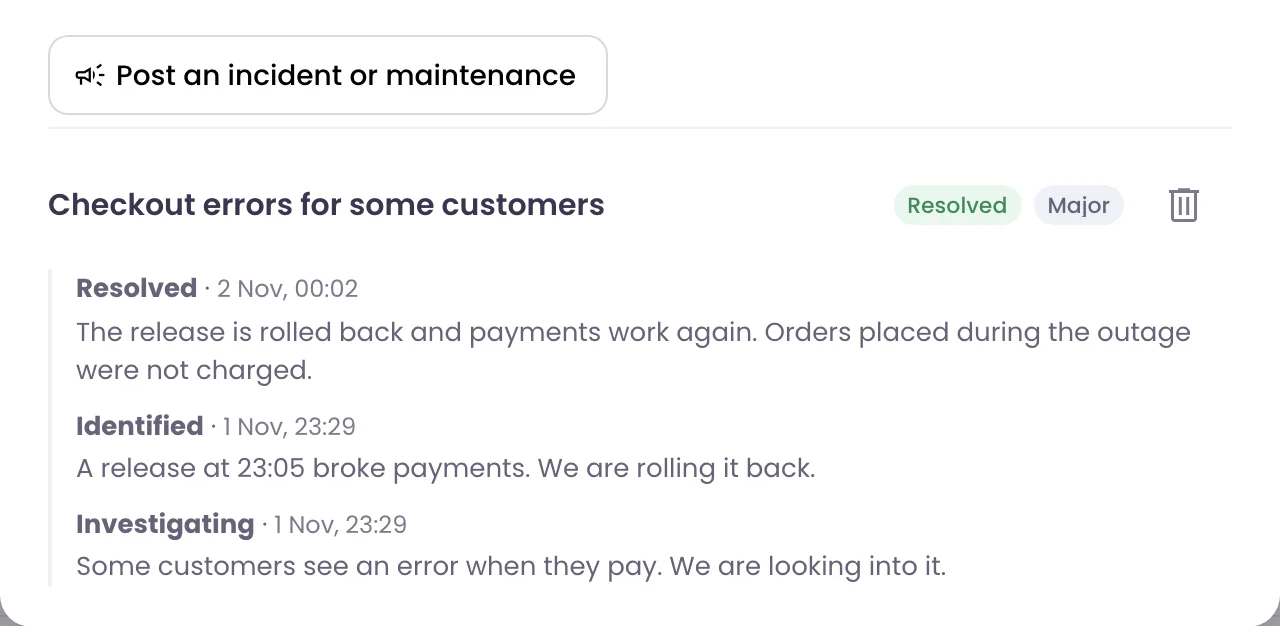
Post the first message within minutes, even before you know the cause. These follow three stages, as in the status page posts further down: investigating, identified, resolved.
4. First message: investigating
We’re seeing [errors on checkout / the site not loading] for some customers since [time, time zone]. We’re looking into it and will update by [time].
5. Update: cause found
We’ve found the cause: [a release at 23:05 / a problem with our hosting provider / an expired certificate]. We’re [rolling it back / working with them / renewing it]. Next update by [time].
6. Partial outage: one feature down
[Feature] isn’t working right now; the rest of [service] is. Until it’s fixed, you can [workaround, such as “order by phone at …”]. Next update by [time].
7. Resolved
[Feature or service] is working again since [time, time zone]. [What happened, in one sentence.] [What it means for customers, such as “Orders placed during the outage were not charged.”] We’re sorry for the trouble.
8. Follow-up email after a long outage
Subject: What happened on [date], and what we’re changing
On [date], [service] was unavailable from [start] to [end] [time zone], about [duration]. [The cause, in two sentences.] [Who was affected and how.] To stop it happening again, we’re [one or two concrete changes]. [Any credit or refund, and how to get it.] If you were affected and need help, reply to this email.
9. Short social post
[Service] is down for some customers. We’re on it and will post updates at [status page link].
Make the maintenance page answer 503, not 200
What customers read is half the job. The other half is the HTTP status code the page sends. RFC 9110 defines 503 Service Unavailable for when a server can’t handle requests “due to a temporary overload or scheduled maintenance”, and lets it add a Retry-After header with “either an HTTP-date or a number of seconds”:
HTTP/1.1 503 Service Unavailable
Retry-After: 7200
Google’s guidance on pausing a website says the same for short breaks: “If you need to urgently disable the site for 1-2 days, then return an informational error page with a 503 HTTP response status code instead of all content”, and use the Retry-After header “with a best effort date or duration”. Two warnings from the same page:
- Don’t return 503 for
robots.txt: it “blocks all crawling”. - For a longer break, keep an indexable home page with status 200 instead. Google removes from its index URLs that “persistently return a server error” (Google’s HTTP status codes page).
A maintenance page served with 200 looks like a normal page with odd text to Google, and like a working site to most uptime checks. More on each code in our HTTP status codes guide.
Where to post: a status page
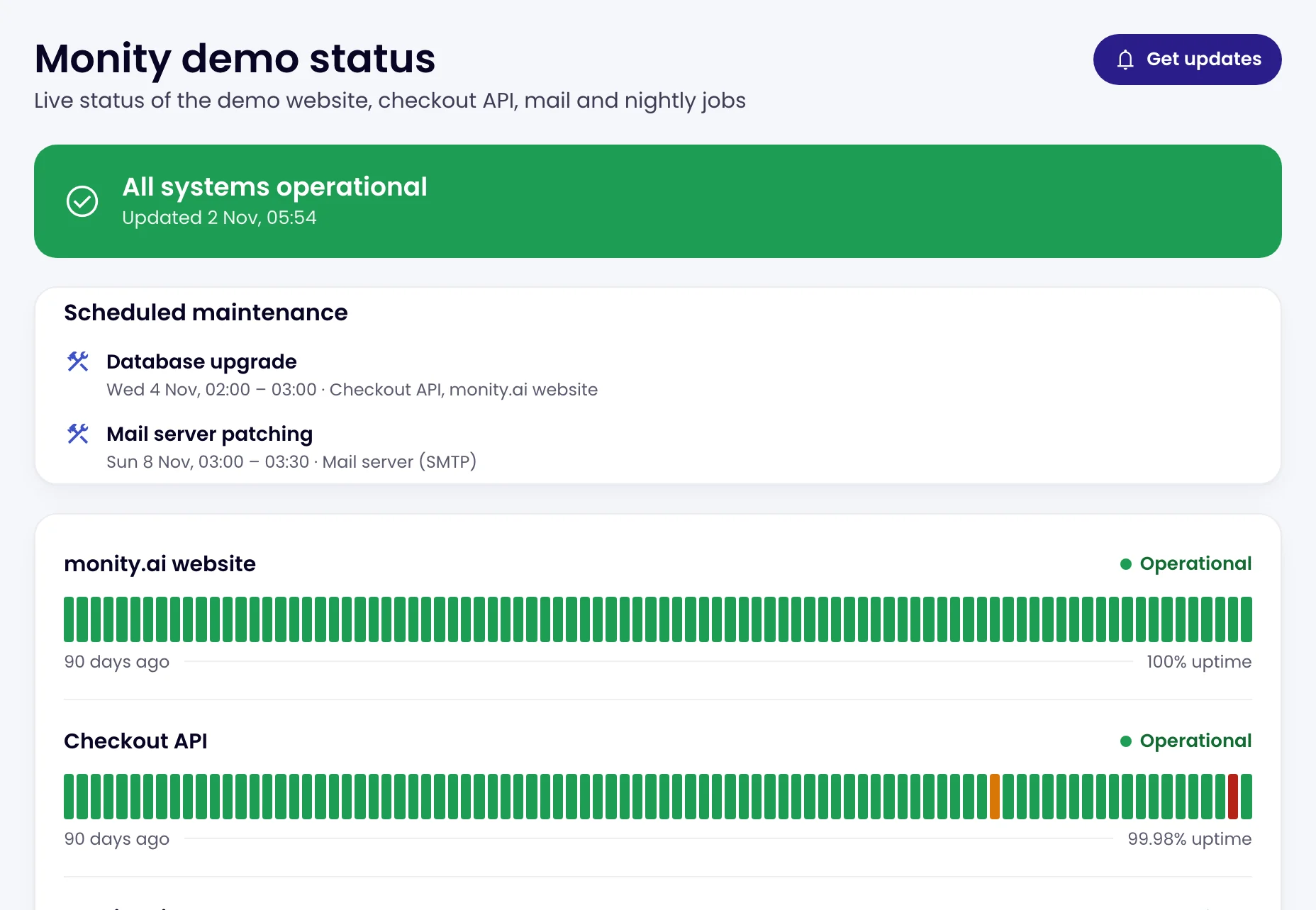
A status page gives every message one home, so the email, banner and social post can all link to it. On monity.ai, a status page is built from your uptime monitors and shows 90 days of daily history for each service, recent incidents and scheduled maintenance. You post incident and maintenance updates on it, and email subscribers, who confirm their address once, receive the posts you send. It can carry your logo and colour, and you can have up to 20 pages per account.
Know when it’s really back
- Uptime checks: Monity’s uptime monitors check every 30 seconds to every hour by plan (every 5 minutes on the free plan), and re-check a failure 3 and 6 seconds later before alerting. Uptime monitors also have maintenance windows for planned work.
- A keyword check: a keyword monitor fails if the page shows your maintenance text, or lacks the text it should have, so a maintenance page left up with status 200 still counts as down.
- The journey itself: after maintenance, a browser test can sign in or go through checkout step by step, so you know the important part works, not only the home page.
Our guide to website down alerts covers who gets told, and how fast.