


MTTR usually means mean time to recovery: the time a service was down, divided by the number of outages. 41 minutes of downtime in 4 incidents is an MTTR of about 10 minutes. The R can also stand for repair, respond or resolve, which time different stretches of the same outage, so say which one you report; Monity (monity.ai) reports recovery, per monitor, as measured from outside.
The four MTTRs
Atlassian’s incident metrics guide lists all four, and teams mix them up:
| MTTR | The clock runs | Useful for |
|---|---|---|
| Mean time to recovery (or restore) | From the failure until the service is fully working again: the whole outage | What users felt; SLAs |
| Mean time to respond | From the first alert until it works again, without the alerting system’s own lag | How fast the team acts once told |
| Mean time to repair | The repair and testing time itself | How efficient the fix is, apart from waiting |
| Mean time to resolve | Detection, diagnosis and repair, and the work so it won’t happen again | The whole cost of an incident |
DORA, the research program behind the four keys of software delivery, moved from MTTR to failed deployment recovery time: “the time it takes to recover from a deployment that fails and requires immediate intervention.” It counts only outages your own releases caused.
How to calculate MTTR
Add up the downtime in a period and divide by the number of incidents. Atlassian’s example: 30 minutes down in two incidents in a day is an MTTR of 15 minutes.
- Pick the period and the service. A monthly figure per service is the usual unit; one number for everything hides the service that keeps failing.
- Count confirmed downtime only. Leave out planned maintenance, and failures that a second check didn’t confirm.
- Divide by the incidents. Then look at the longest one too: the mean of one 2-minute blip and one 2-hour outage is 61 minutes, which describes neither.
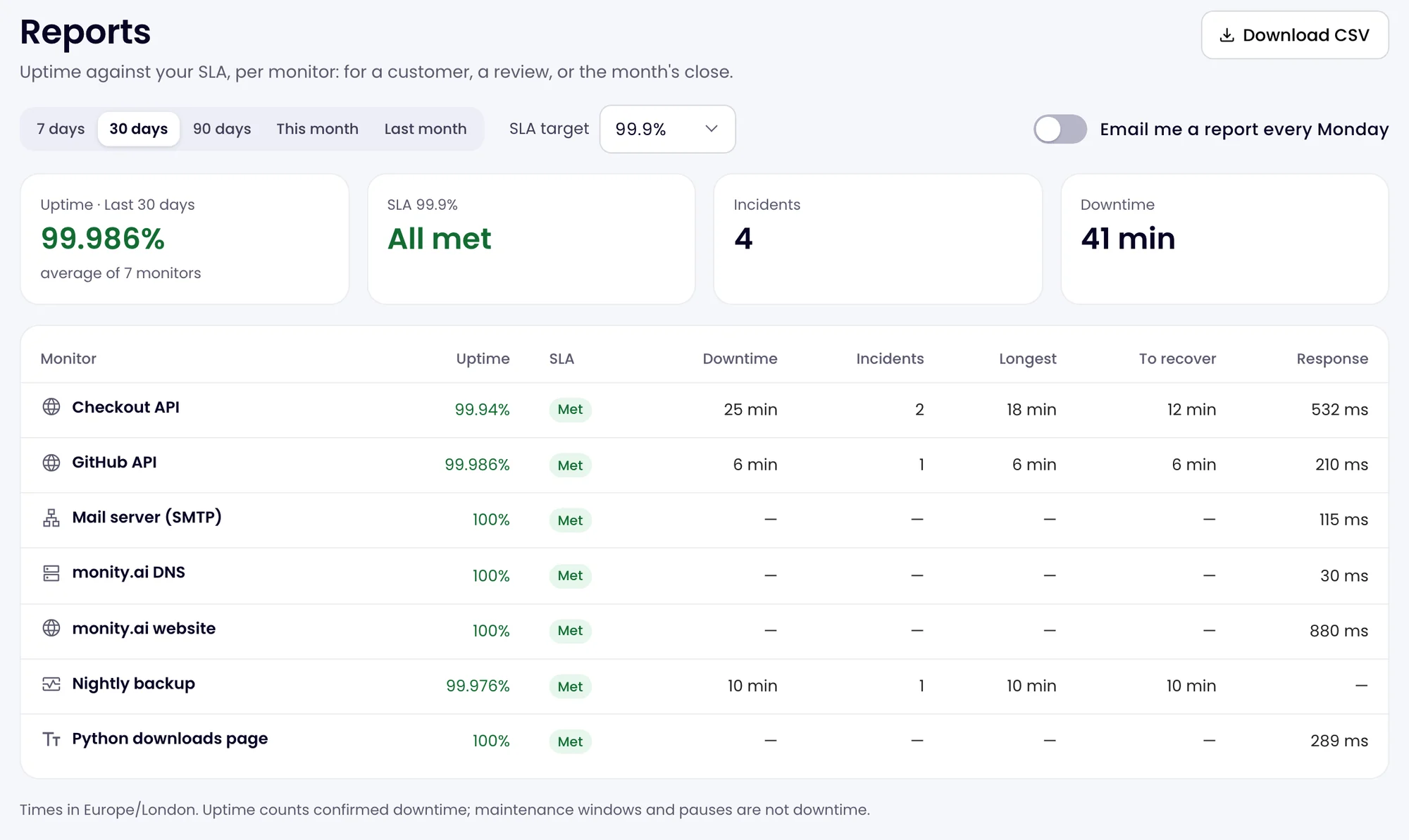
Read it against your SLA. A 99.9% target over 30 days allows 43 minutes of downtime: with an MTTR of 12 minutes, four outages use it up.
Where the minutes of an outage go
- Noticing. An outage that starts between two checks waits for the next one: on average half the interval, so 2.5 minutes with checks every 5 minutes, 30 seconds with checks every minute.
- Confirming and alerting. Monity re-checks a failure 3 and 6 seconds later before it alerts, so a single dropped request doesn’t wake anyone.
- Someone taking it. The time to acknowledge, which Atlassian calls MTTA. An alert that lands in a channel nobody watches at night can wait hours for someone to see it.
- Finding the cause. The failed check’s status, timings, headers and response say whether it’s DNS, the certificate, the proxy or the app.
- Fixing and confirming. A rollback or restart, then a check that finds it up and ends the incident.
How to cut MTTR
- Check more often. Uptime checks run every 5 minutes on Monity’s free plan, every minute on Personal Small ($10 a month billed yearly), and every 30 seconds on plans that check pages every 5 minutes.
- Send alerts where people are, on several channels: Slack or Microsoft Teams for the team, the phone app for whoever is on call, email as a record. Reminders repeat, every 15 minutes to every 24 hours as you choose, until someone acknowledges.
- Start from the likely cause. A Monity incident shows a likely cause from rules, the failed check’s details, a screenshot for websites and an optional AI explanation, so the first minutes aren’t spent reproducing it.
- Make rollback the first move when a deploy caused it, and run browser tests after each deploy, so a broken checkout is found before customers find it.
- Tell users on a status page. It doesn’t shorten the outage, but it stops the support queue from taking the people who are fixing it.
- Review every incident. Notes on the incident’s timeline are the start of a postmortem; the Monday report shows whether MTTR is going down.
What Monity measures, and what it doesn’t
Monity measures recovery from outside, as a visitor sees it: an incident runs from the check that found the service down, confirmed, to the check that found it back up. Maintenance windows and paused monitors aren’t downtime. It doesn’t know when your engineer started the repair, so it can’t give mean time to repair, and it has no on-call rotations or escalation policies: send its alerts to a tool that has them through a webhook. More in uptime reports and alerts and incidents.