


SLA and uptime calculator: allowed downtime for any percentage
An SLA of 99.9% allows 43 minutes 50 seconds of downtime a month and 8 hours 46 minutes a year. Enter any percentage to see its downtime budget, turn downtime back into uptime, or combine several services.
How it works
-
Enter an SLA
Type a percentage such as 99.95, or pick one of the nines, and see the downtime it allows per day, week, month, quarter and year.
-
Or start from downtime
Enter how long a service was down, such as 1h 30m, and the period, to get its uptime percentage.
-
Combine services
See the availability of services that all must work, or of redundant copies where one is enough.
Monity’s free SLA and uptime calculator turns an availability percentage into the downtime it allows, and downtime back into a percentage. It assumes a service meant to run around the clock, a year of 365.25 days and a month of a twelfth of that (30.44 days); enter your own period in days for a 30- or 31-day month.
Downtime allowed by common SLAs
| SLA | Per day | Per week | Per month | Per year |
|---|---|---|---|---|
| 99% | 14m 24s | 1h 40m 48s | 7h 18m 18s | 3d 15h 39m 36s |
| 99.5% | 7m 12s | 50m 24s | 3h 39m 9s | 1d 19h 49m 48s |
| 99.9% | 1m 26s | 10m 5s | 43m 50s | 8h 45m 58s |
| 99.95% | 43.2s | 5m 2s | 21m 55s | 4h 22m 59s |
| 99.99% | 8.6s | 1m | 4m 23s | 52m 36s |
| 99.999% | 0.9s | 6s | 26.3s | 5m 16s |
How the numbers are worked out
- Allowed downtime = (1 − SLA ÷ 100) × period. 99.9% of a 30.44-day month leaves 0.1% of 2,629,800 seconds: 2,629.8 seconds, or 43 minutes 50 seconds.
- Uptime = (period − downtime) ÷ period × 100. Two outages of 20 and 25 minutes in a 30-day month are 99.896%: the 99.9% target is missed by about two minutes.
- Services in series (a site that needs its database and its payment provider): multiply the availabilities. Three services at 99.9%, 99.95% and 99.99% give 99.84%.
- Redundant copies (two servers behind a load balancer): 1 − (1 − A) × (1 − B). Two at 99% give 99.99%, but only if they fail independently; a shared power supply or a shared bad deploy breaks that.
What an SLA usually leaves out
The downtime a target allows is what Google’s Site Reliability Engineering book calls an error budget (Embracing Risk): time a team can spend on outages and risky changes before it breaks the promise. The book also notes that a user on a 99% reliable phone can’t tell 99.99% from 99.999%, so more nines aren’t always worth their cost.
The number alone says little until the contract defines its terms. Check how it defines downtime (all users, or a share of requests), how it is measured (from where, how often, and after how many failed checks), whether planned maintenance is excluded, and what the period is: a 28-day February allows 8% less downtime than the average month. Many SLAs pay service credits, often only when you claim them.
Measuring it: the check interval sets the floor
A check every 5 minutes can miss an outage shorter than 5 minutes, and measures a longer one only to within 5 minutes. That is enough for 99.9% (a 43-minute monthly budget), but not for 99.99%, whose 4 minutes 23 seconds fits between two checks. Measure tight SLAs every minute or every 30 seconds, and confirm a failure before you count it, so one dropped request doesn’t spend the budget.
Report uptime against your SLA with Monity
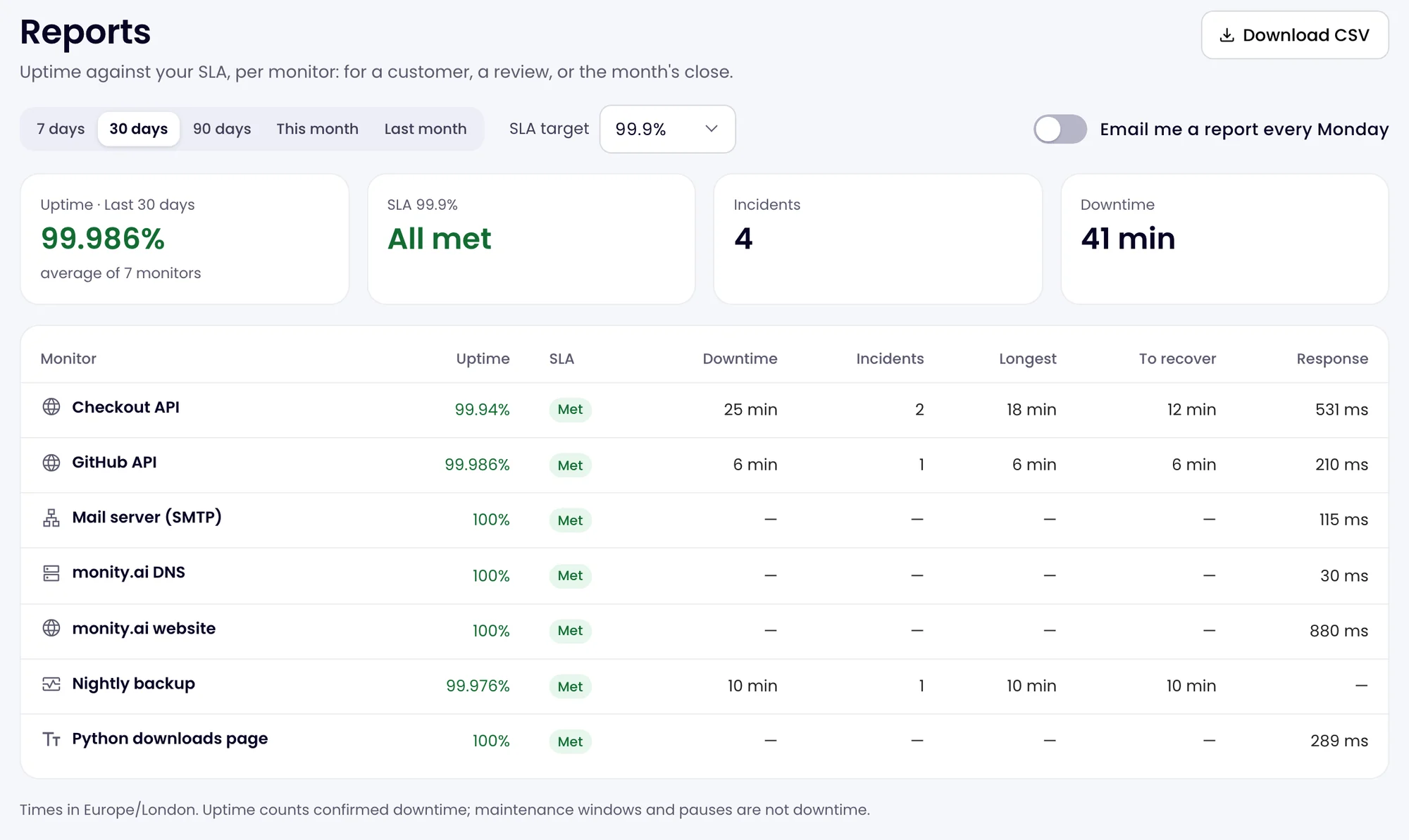
In uptime monitoring, Monity checks websites, APIs, ports and DNS every 30 seconds to every hour (every 5 minutes on the free plan), checks a failure again 3 and 6 seconds later before it counts, and reports each monitor’s uptime against your SLA target, with a CSV export and a Monday email (uptime reports). Downtime is counted once confirmed; maintenance windows and pauses don’t count. To check one site now, use the website down checker.
FAQ
Common questions
How much downtime does 99.9% uptime allow?
43 minutes 50 seconds a month, 10 minutes 5 seconds a week, 1 minute 26 seconds a day, and 8 hours 45 minutes 58 seconds a year, counting a year as 365.25 days and a month as a twelfth of it.
How do I calculate uptime percentage?
Divide the time the service was up by the whole period and multiply by 100: (period − downtime) ÷ period × 100. 45 minutes of downtime in an average month (30.44 days) is 99.897% uptime, just under 99.9%.
What is the difference between 99.9% and 99.99%?
Ten times less downtime: 43 minutes 50 seconds a month for 99.9%, 4 minutes 23 seconds for 99.99%. Each extra nine divides the budget by ten.
How do I calculate the SLA of services that depend on each other?
When all of them must work, multiply their availabilities: 99.9% × 99.9% is 99.8%, lower than either. When redundant copies stand in for each other, the whole is down only when every copy is: two copies at 99.9% give 99.9999%, if they fail independently.
How often do I need to check to measure a 99.99% SLA?
More often than the budget. 99.99% allows 4 minutes 23 seconds a month, and a check every 5 minutes can miss an outage of that length. Checks every minute or every 30 seconds see it.
Can Monity report uptime against an SLA?
Yes. Its uptime reports show each monitor’s uptime against your SLA target over 7, 30 or 90 days or a calendar month, with downtime, incidents, a CSV export and an optional Monday email. Downtime is counted once a failure is confirmed, and maintenance windows and pauses don’t count.
How much downtime do 99.95% and 99.999% allow?
Counting a year as 365.25 days and a month as a twelfth of it, 99.95% allows 21 minutes 55 seconds a month and 4 hours 22 minutes 59 seconds a year. Five nines, 99.999%, allows 26 seconds a month and 5 minutes 16 seconds a year: less than the gap between most checks.
Measure the uptime you promise.
Get SLA reports.
Monity checks your sites and APIs as often as every 30 seconds and reports uptime against your SLA target.
- Free 7-day trial
- No credit card
- 3 monitors free, forever