An uptime monitor requests your site, API or server on a schedule and alerts you when it stops answering properly. Almost every tool does that part well. They differ in how often they check, how they confirm an outage before waking you, what they charge for more monitors, and what else comes with them: status pages, cron job monitoring, browser tests, on-call.
So this list is grouped by the job. We make Monity, which is one of the ten tools here, and we say where the others are the better pick. Every price and limit comes from the vendor’s own pricing page or README, checked on 2 November 2026.
Quick picks
- One site or a few, free: UptimeRobot (50 monitors every 5 minutes) or HetrixTools (15 monitors every minute).
- Client sites for an agency: Oh Dear, or Monity if you also want to watch what’s on the pages.
- A SaaS product with an API and a public status page: Monity, Better Stack or UptimeRobot Team.
- Cron jobs and backups: Healthchecks.io or Cronitor, or the heartbeat monitors built into most tools here.
- Login, sign-up and checkout, not only the home page: Checkly if your team writes Playwright, Monity if it doesn’t.
- On-call rotations and phone alerts: Better Stack.
- Self-hosted: Uptime Kuma.
Ten uptime monitoring tools compared
| Tool | Free plan | Paid plans from | Fastest checks | Also does |
|---|---|---|---|---|
| Monity (ours) | 3 monitors every 5 minutes | Personal 1k: $10/mo billed annually ($12 monthly) | Every 30 seconds (Personal 10k, Business 20k and up) | Status pages, heartbeats, browser tests, website change monitoring |
| UptimeRobot | 50 monitors every 5 min | Solo: €9/month billed annually (€10 monthly) | Every 15 sec (Scale) | Status pages, SSL and domain expiry |
| HetrixTools | 15 uptime monitors, every minute | Professional: $9.95/month or $99.95/year | Every minute, on every plan | Server monitoring, status pages |
| Better Stack | 10 monitors and heartbeats (personal projects) | Responder: $29 per license per month billed annually ($34 monthly) | Up to 30 seconds | On-call, incident management, logs |
| StatusCake | 3 monitors every 15 minutes, personal use | Superior: $20.41/mo billed yearly ($24.49 monthly) | Every 30 seconds (Business) | Page speed, SSL and domain monitors |
| Oh Dear | 10-day free trial | Solo: €15/mo for 2 sites | Not published on the pricing page | Broken links, Lighthouse, DNS, cron, status pages |
| Pingdom | Free trial | $16.5/mo billed annually for 10 uptime checks | Not published on the pricing page | Transaction checks, real user monitoring |
| Checkly | 10 uptime monitors every 2 min | Starter: $24 per month billed annually | Every 30 sec (Team) | Playwright browser checks, API checks |
| Cronitor | 5 monitors | $2/mo per monitor + $5/mo per user | Every 5 minutes on the free plan | Cron and heartbeat monitoring, status pages |
| Uptime Kuma | Free and open source, self-hosted | None | 20-second intervals | Status pages, 90+ notification services |
What to look for before you pick
- How an outage is confirmed. A single failed request is often a blip. Good tools retry, or check from somewhere else, before they alert. Ask what happens when the monitoring service itself has a network problem.
- The interval you’ll actually pay for. Free plans check every 2 to 15 minutes. Decide how quickly you need to know, then compare the price of that interval, not the headline price.
- What counts as down. A status code is the minimum. A keyword check catches an error page served with 200 OK, and a check on a JSON value catches an API that answers but reports itself unhealthy.
- Where alerts go, and whether that’s on your plan. Slack, Teams and webhooks are on every plan at some vendors and on higher tiers at others.
- What else you’d otherwise pay for separately: a status page, cron job monitoring, certificate and domain expiry, browser tests.
By the job
One site, or a handful
If you run a personal site, a small shop or a side project, a free plan is enough. UptimeRobot watches 50 monitors every 5 minutes for free and allows commercial projects. HetrixTools gives 15 monitors checked every minute, free, as long as you log in every 90 days. StatusCake‘s free plan is smaller: 3 monitors every 15 minutes for personal use.
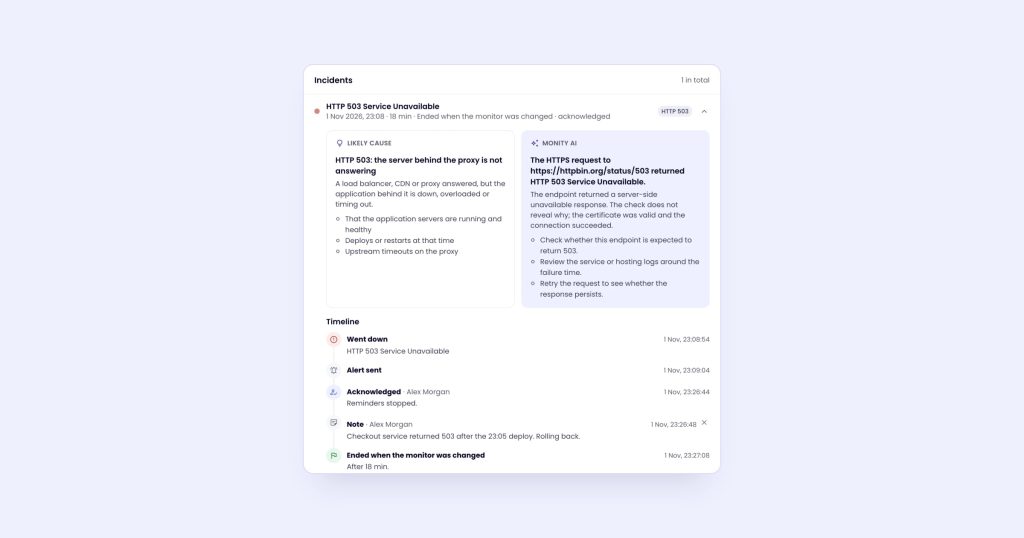
Monity‘s free plan has 3 monitors every 5 minutes, but each comes with an incident page (likely cause, a screenshot when it went down, a timeline), a status page and every alert channel, webhooks and Telegram included. It suits a small site whose owner also wants to know when something on a page changes.
Client sites for an agency
Agencies need many monitors, client separation and reports. Oh Dear gives every feature on every plan and prices by site count: €49/mo for 10 sites, €99/mo for 25. It also checks broken links, mixed content and Lighthouse scores.
Monity keeps each client in its own workspace, with its own monitors, status page and alert channels, and sends a weekly uptime report by email on Monday morning. Uptime monitors cost little: 1,000 checks use 1 credit, so a monitor checked every 5 minutes uses 9 credits a month. Business 10k ($50/mo billed annually, $70 monthly) has 100 tasks and 5 seats. More on how agencies monitor client websites.
A SaaS product with an API and a status page
You want API checks that read the response, a public status page your customers can subscribe to, and alerts in Slack.
- Monity: Website monitors check the status, a keyword, or up to 10 JSON values and headers (
$.statusequalsok, for example). Status pages are on every plan, up to 20 per account, with incident and maintenance posts and email subscribers who confirm first. Reports show uptime against an SLA target from 99% to 99.99%, with a CSV. - Better Stack: monitoring, status pages, on-call and incident management in one platform. A Responder license is $29 per month billed annually and includes unlimited phone call and SMS alerts. Extra public status pages are $12 per month billed annually.
- UptimeRobot Team: €35/month billed annually for 100 monitors every 30 seconds, 3 seats and 100 status pages with white-label.
Cron jobs, backups and queues
These don’t have a URL to request: they run and finish. A heartbeat monitor gives you a secret URL that the job calls when it’s done, and alerts you when the call doesn’t come.
- Healthchecks.io is built for this: 20 jobs free, 100 jobs for $20 / month.
- Cronitor has 5 free monitors and then charges $2/mo per monitor plus $5/mo per user.
- Monity, Better Stack, Oh Dear and Uptime Kuma include heartbeats with their uptime monitors. In Monity a heartbeat can be expected every minute up to every 24 hours, plus a grace period.
Our guide to cron job monitoring has crontab, systemd and GitHub Actions examples.
Login, sign-up and checkout
A site can be up while the checkout button does nothing. For that you need a browser that walks through the journey.
- Checkly runs Playwright checks written as code: 1,000 browser checks a month free, 3k on Starter at $24 per month billed annually. It fits teams that already write tests in their repository.
- Monity runs browser tests you build as a list of steps (or draft from a sentence with AI), on a schedule or after a deploy, with a screenshot of every step. A run uses 1 credit per started minute. See testing your website without code.
- Pingdom includes transaction checks in its synthetic monitoring, from $16.5/mo billed annually.
On-call teams
If the alert has to reach whoever is on call and escalate when nobody answers, Better Stack has on-call scheduling, unlimited phone call alerts and incident management built in. Most other tools here can send a webhook to your paging tool instead.
Self-hosted
Uptime Kuma is open source under the MIT license and runs with Docker Compose. It covers HTTP, keyword, JSON, TCP, ping, DNS, push and Docker container monitors at intervals down to 20 seconds. Run it somewhere other than the servers it watches, or it goes down with them.
Want to see it on your own site first?
Send us the sites, pages and journeys you check by hand. We set up the monitors, confirm they read the right thing and email you the first result, usually within a business day. Free, no account, no card.
Monity, in more detail (ours)
An uptime monitor in Monity is a task like a page monitor: same workspaces, labels, alert channels and history. What it does:
- Five kinds: Website, Keyword, Port, Heartbeat and DNS (A, AAAA, CNAME, MX, TXT or NS records).
- Confirmation before an alert: two retries, 3 and 6 seconds after a failure, and a check of Monity’s own connection against three well-known sites before a network failure becomes an incident.
- Expiry warnings: an alert before the TLS certificate expires (14 days by default) and before the domain’s registration ends (30 days by default, looked up over RDAP).
- Alert timing: at once, or only after it has been down for a while; reminders while it stays down; a recovery alert; a slow-response alert after three slow answers in a row.
- Maintenance windows: once, daily, weekly or monthly, with no checks, alerts or downtime counted while they run.
- Status pages and reports, on every plan.
Where it’s weaker: the free plan is 3 monitors, there’s no ICMP ping or UDP monitor, and you can’t choose the location checks run from. The uptime monitoring docs cover every setting.
Try Monity on the sites you look after
Start on the free plan in a few minutes, or let us set it up and send you the first result. Slack, Teams, Google Sheets and every other alert channel are included either way.