Skip to content Use Monity from Claude, ChatGPT or Codex: set up monitors and ask what changed, from a chat. Use Monity from Claude, ChatGPT or Codex Connect yours
Comparison · Updated November 2026

Monity vs Browse AI

Pick Browse AI if scraping is the whole job: it is open to everyone today, runs as often as every 5 minutes, includes residential proxies and connects to thousands of apps. Pick Monity if you want the data inside the tool that already watches your pages: every run says which rows are new, changed or gone, alerts go to Slack or Teams, and a credit buys a page however many rows are on it. Datasets are in early access, so you ask for them first.

  • Free basic plan
  • No credit card
  • Verified November 2026
Monity vs Browse AI
Pick Monity if
  • You want to be told which rows are new, changed or gone
  • Your lists have many rows on a page
  • You also watch pages, uptime or sign-up flows
Pick Browse AI if
  • You need it today, without asking for access
  • You need runs more often than every hour
  • You need residential proxies or many app integrations

Browse AI

Browse AI is a web scraping and monitoring tool built around robots. Every plan, the free one too, has unlimited robots, monitoring every 5 minutes, residential proxies, a REST API, webhooks and bulk runs, and you pay for credits.

Not sure which tool you need? Read the difference between web scraping and monitoring.

Feature comparison

Monity vs Browse AI, feature by feature.

What each side includes, row by row. Browse AI’s column is from its own pricing page, November 2026.

Capability
Monity
Browse AI
Who can use it
Early access: ask from the Datasets page
Open to everyone, with a free plan
How you build one
Click one item and Monity finds the rest of the list; Monity AI can draft the steps
Robots, unlimited on every plan
Where a run starts
One address, up to 1,000, a CSV, another dataset’s rows, or pages found from a sitemap
Bulk runs on every plan
How often it runs
Every hour to once a month
As often as every 5 minutes, on every plan
What a run reports
Rows that are new, changed, gone or back, with the old and new value of each field
See Browse AI’s site
Alerts
Email, Slack, Teams, Discord, Telegram, Google Sheets, webhooks and app push, for new, gone or changed rows
Webhooks and thousands of integrations
Export
CSV, JSON, JSON Lines, Markdown and Excel
REST API and integrations
AI assistants
Ask Claude Code, Codex or another MCP client about your datasets
Not on the pricing page
How credits are counted
1 credit for each page a run opens, however many rows are on it
1 credit for a standard page; 1 credit for every 10 rows from list pages
Free plan
100 credits a month, once you have early access
50 credits a month: up to 50 pages or 500 rows
Sites that refuse datacenter addresses
Through a proxy you bring
Residential proxies on every plan
Pages behind a sign-in
A saved login
See Browse AI’s site
A team that builds it for you
Setup help on every plan
Premium: a managed service from $500 a month billed annually
Page change monitoring, uptime and browser tests
Not on the pricing page
Compliance
UK-based; DPA on request
SOC 2 Type II, GDPR, CCPA
Pricing

What you'd pay, side by side.

Plans differ in what they count, so compare what each includes. Check Browse AI's current pricing page before you buy.

Monity
Free$0100 credits a month · 1 credit for each page a run opens
Personal 1k$10/mo1,000 credits a month · 1 credit for each page a run opens · billed yearly ($12 monthly)
Business 5k$25/mo5,000 credits a month · 1 credit for each page a run opens · billed yearly ($35 monthly)
Business 10k, 5 seats$50/mo10,000 credits a month · 1 credit for each page a run opens · billed yearly ($70 monthly)
See all plans →
Browse AI
Free$050 credits a month, up to 50 pages or 500 rows, 2 domains
Personal$19/mobilled annually for 12,000 credits a year and 10 domains; $48 billed monthly for 2,000 credits a month
Professional$69/mobilled annually for 60,000 credits a year and 50 domains; $87 billed monthly
PremiumFrom $500 a montha managed service · billed annually
Browse AI pricing →

Prices as of November 2026.

Pros and cons

The honest trade-offs.

Monity

Pros

  • Every run says which rows are new, changed, gone or back, field by field
  • A credit buys a whole page, however many rows are on it
  • Alerts in Slack, Teams, Discord, Telegram, Google Sheets, a webhook or the phone app, on every plan
  • Rows go to Claude Code, Codex or another MCP client, as well as CSV, JSON and Excel
  • The same account watches pages for changes, checks uptime and runs browser tests

Cons

  • Early access: you have to ask for Datasets
  • Runs every hour at the fastest
  • No residential proxies included: you bring your own proxy
  • Far fewer app integrations

Browse AI

Pros

  • Open to everyone, with a free plan and no card
  • Monitoring every 5 minutes on every plan, the free one too
  • Residential proxies and thousands of integrations on every plan
  • A managed service, with data engineers who build it for you
  • A SOC 2 Type II report

Cons

  • List pages cost 1 credit for every 10 rows
  • The free plan is 50 credits a month
  • Paid plans start at $19 a month billed annually, with all credits bought upfront
  • No page change monitoring, uptime checks or browser tests on its pricing page
Migration guide

Switching from Browse AI.

  1. List your Browse AI robots: the pages each one reads, the fields it keeps and how often it runs.
  2. In Monity, open Datasets and ask for early access if your account does not have them yet.
  3. Make a dataset for each robot: open the page in the steps editor, click one item of the list and check the fields Monity proposes. Add Next page for lists that run over several pages.
  4. Set the schedule, from every hour to once a month, and choose which rows alert you: new, gone, or changes in the fields you pick.
  5. Send the rows where you need them: a Google Sheet, a webhook, an export, or an AI assistant over MCP.
  6. Run both side by side until the rows match, before you cancel anything.

FAQ

Switching questions, answered

Can anyone use Monity Datasets today?

Not yet. Datasets are in early access. Start a free account, open Datasets in the app and click Ask for early access, or write to us through the contact page. Browse AI is open to everyone, with a free plan.

How do the credits compare?

They count different things. Browse AI charges 1 credit for a standard page and 1 credit for every 10 rows taken from a list page. Monity charges 1 credit for each page a run opens, however many rows are on it, so a list with many rows on a page costs less in credits on Monity, and single pages cost the same.

Which one runs more often?

Browse AI: monitoring every 5 minutes is on every plan, the free one too. A Monity dataset runs from every hour to once a month. For one page that has to be checked every few minutes, a Monity page monitor is the tool, not a dataset.

What does a Monity dataset tell me that a plain export does not?

What moved. Each run is compared with the one before, row by row, and the Changes tab lists the rows that are new, changed, gone or back, with the old and the new value of every field that changed. You can be alerted only on the fields you care about, such as the price.

What about sites that refuse automated visitors?

Browse AI lists residential proxies on every plan. Monity reads a site through a proxy you bring when the site refuses datacenter addresses, and reads pages behind a sign-in with a saved login.

What else does a Monity account do?

It watches single pages for changes and tells you what changed in a sentence, checks that your website and APIs are up, and runs browser tests of sign-up, login and checkout. Datasets use the same alert channels and the same credits.

Try Monity next to Browse AI.

Datasets are in early access. Start a free account, open Datasets and ask for access; page monitors, uptime and tests are yours from the first minute.

  • Free plan: 3 tasks, no card
  • 7-day Business trial
  • Every alert channel on every plan
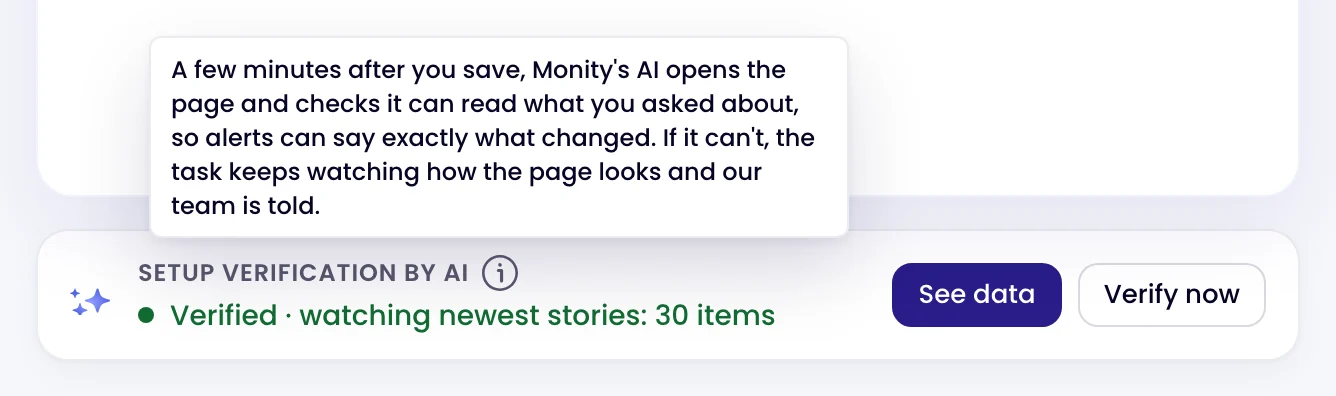
The Setup verification by AI card on a page monitor: Verified · watching newest stories: 30 items
Kamil, Alex and Martyna A person replies by email

Have a question?

Pricing, security or scoping: pick one and your message goes to a person on the team.