A cron job that fails usually fails silently. The backup script hits a full disk, the server is rebuilt without its crontab, a credential expires, and nothing tells you until you need the backup. An uptime monitor can’t help, because there’s no page to request.
Heartbeat monitoring turns it around: the job calls a URL each time it finishes, and the monitor alerts you when the call doesn’t arrive in time. This guide sets one up in Monity, which we make, with examples you can paste. The pattern works with any heartbeat service.
How heartbeat monitoring works
- You create a heartbeat monitor and say how often the job should check in, plus a grace period.
- You get a secret URL, unique to that job.
- The job calls the URL at the end of each successful run.
- If no call arrives within the interval plus the grace period, the monitor goes down and you get an alert. The next call brings it back up within seconds.
The job never needs to know whether Monity is reachable, and a broken job, a missing crontab and a dead server all look the same: silence.
Step 1: create the heartbeat monitor
- Open Uptime in the sidebar and click New monitor.
- Choose Heartbeat and give it a Name such as “Nightly database backup”.
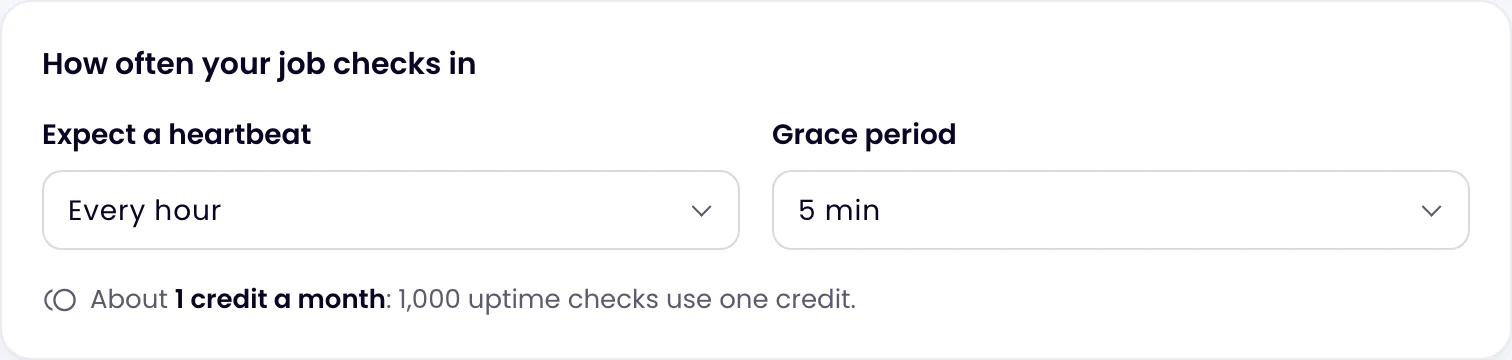
- Under Expect a heartbeat, choose how often the job runs: every 1, 5, 10, 15 or 30 minutes, every hour, or every 6, 12 or 24 hours.
- Choose a Grace period: how late the job may be before it counts as missing. The options are 1, 5, 15 or 30 minutes, 1 hour or 6 hours; 5 minutes is the default.
- Choose where alerts go under Send alerts to, then click Create monitor.
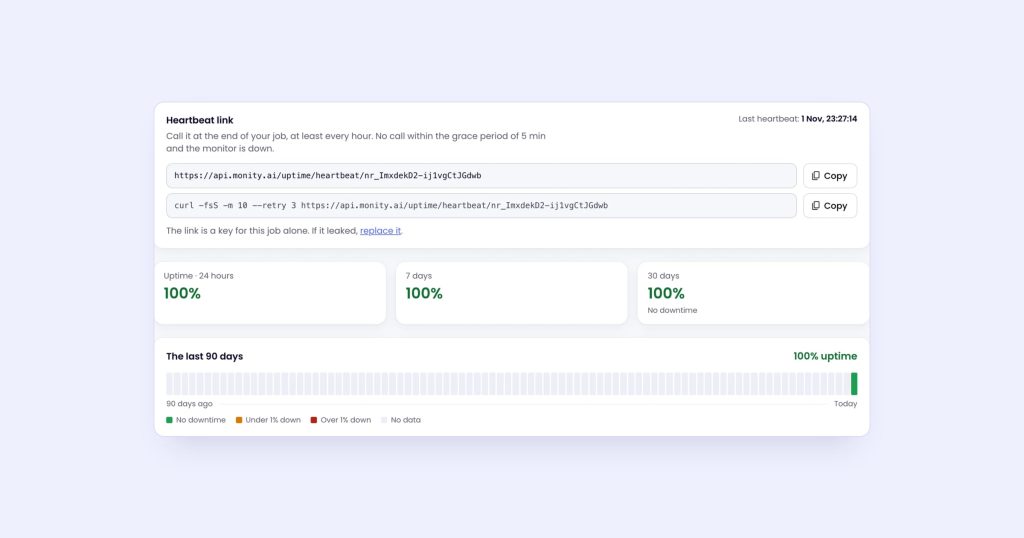
The monitor’s page then shows the Heartbeat link, a ready-made command to copy, and the time of the last heartbeat. Only admins and editors see the link, because it works like a key. If it leaks, replace it from the same card.
The link looks like this:
https://api.monity.ai/uptime/heartbeat/YOUR_TOKENIt accepts GET, POST or HEAD, with no sign-in.
Step 2: call it when the job succeeds
The command Monity gives you is:
curl -fsS -m 10 --retry 3 https://api.monity.ai/uptime/heartbeat/YOUR_TOKEN-fsS keeps it quiet unless something goes wrong, -m 10 gives up after 10 seconds so a network problem can’t hang your job, and --retry 3 retries a failed call.
crontab
Chain the call with &&, so it only runs when the job succeeds:
# Nightly database backup at 03:00, then the heartbeat
0 3 * * * /usr/local/bin/backup-db.sh && curl -fsS -m 10 --retry 3 https://api.monity.ai/uptime/heartbeat/YOUR_TOKEN > /dev/null
Set this monitor to Expect a heartbeat every 24 hours, with a grace period longer than the backup ever takes, such as 1 hour.
A shell script
For a longer script, stop at the first error and call the heartbeat on the last line:
#!/usr/bin/env bash
set -euo pipefail

pg_dump --format=custom mydb > /backups/mydb.dump
aws s3 cp /backups/mydb.dump s3://my-backups/

curl -fsS -m 10 --retry 3 "$MONITY_HEARTBEAT_URL" > /dev/null
Keep the URL in an environment variable or a secrets store rather than in the script.
systemd timer
ExecStartPost runs only after ExecStart succeeded:
# /etc/systemd/system/backup.service
[Unit]
Description=Nightly database backup

[Service]
Type=oneshot
ExecStart=/usr/local/bin/backup-db.sh
ExecStartPost=/usr/bin/curl -fsS -m 10 --retry 3 https://api.monity.ai/uptime/heartbeat/YOUR_TOKEN
GitHub Actions on a schedule
Store the link as a repository secret named MONITY_HEARTBEAT_URL, and call it as the last step:
name: Hourly sync
on:
  schedule:
    - cron: "0 * * * *"
jobs:
  sync:
    runs-on: ubuntu-latest
    steps:
      - uses: actions/checkout@v4
      - run: ./scripts/sync.sh
      - name: Tell Monity the sync ran
        run: curl -fsS -m 10 --retry 3 "${{ secrets.MONITY_HEARTBEAT_URL }}"
A failed step stops the job, so the heartbeat step only runs after a successful sync. GitHub can start scheduled workflows late when it’s busy, so give this monitor a generous grace period.
Kubernetes CronJob
apiVersion: batch/v1
kind: CronJob
metadata:
  name: report
spec:
  schedule: "*/15 * * * *"
  jobTemplate:
    spec:
      template:
        spec:
          restartPolicy: Never
          containers:
            - name: report
              image: registry.example.com/report:latest
              command: ["/bin/sh", "-c", "./build-report && curl -fsS -m 10 --retry 3 \"$MONITY_HEARTBEAT_URL\""]
              env:
                - name: MONITY_HEARTBEAT_URL
                  valueFrom:
                    secretKeyRef:
                      name: monity
                      key: heartbeat-url
The image needs curl. Any HTTP client works: the call is a plain GET.
From your own code
At the end of a worker, a queue consumer or a serverless function:
import urllib.request

def main():
    run_the_job()
    urllib.request.urlopen("https://api.monity.ai/uptime/heartbeat/YOUR_TOKEN", timeout=10)
await runTheJob();
await fetch(process.env.MONITY_HEARTBEAT_URL, { signal: AbortSignal.timeout(10000) });Choosing the interval and grace period
- Interval: the job’s schedule. A job every 15 minutes gets “every 15 minutes”.
- Grace period: a little more than the longest the job ever takes, plus any delay in starting it. Too short and you get alerts for slow runs; too long and you hear late.
- Long jobs: call the heartbeat at the end, not the start. A call at the start proves the job began, not that it finished.
The shortest interval follows your plan: every 5 minutes on Free, every minute on paid plans. Heartbeats use credits like other uptime monitors, and 1,000 checks use 1 credit. Each heartbeat monitor counts as one task.
Mistakes to avoid
- Calling the heartbeat whatever happened.
; curl …instead of&& curl …reports success after a failure. - Letting the call fail the job. If the heartbeat is the last command, a network hiccup can mark a good run as failed in your scheduler. Add
|| trueif that matters to you. - One URL for several jobs. Each job needs its own monitor, or one healthy job hides another that stopped.
- Forgetting maintenance. When you stop jobs on purpose, schedule a maintenance window for the monitor on the Uptime page. A heartbeat gets a full interval and grace period from the window’s end.
- Jobs that run less often than daily. A heartbeat in Monity waits at most 24 hours plus the grace period, so a weekly job needs a daily check-in, or another tool.
What the alert tells you
When the call doesn’t come, the monitor goes down and the alert goes to your channels: email, Slack, Microsoft Teams, Discord, Telegram, Google Sheets, a webhook or push to your phone. The monitor’s page shows when the last heartbeat arrived and opens an incident you can acknowledge and add notes to. When the job calls again, you get a recovery alert with how long it was missing.
Other heartbeat tools
| Tool | Free plan | Paid plans from |
|---|---|---|
| Monity (ours) | 3 monitors (heartbeats, uptime or page monitors), with status pages | Personal 1k: $10/mo billed annually |
| Healthchecks.io | 20 jobs | Business: $20 / month for 100 jobs |
| Cronitor | 5 monitors | $2/mo per monitor + $5/mo per user |
| Better Stack | 10 monitors and heartbeats, for personal projects | Additional 10 heartbeats: $17 per month billed annually |
Prices from each vendor’s pricing page on 2 November 2026. Healthchecks.io and Cronitor are built for scheduled jobs; Monity puts heartbeats next to website uptime, status pages and browser tests.
Set one up on the free plan: start with Monity. The uptime monitoring docs explain every heartbeat setting, and how to get an alert when your website goes down covers the other monitor kinds.