Data Extraction
Pull the exact fields you care about from any page, like prices, stock, dates, and statuses, and track them as structured data, not screenshots.
- Values, lists and tables
- Verified by Monity’s AI
- Compared item by item
Read by Monity’s AI
Monity reads what you asked about, and proves it reads it right.
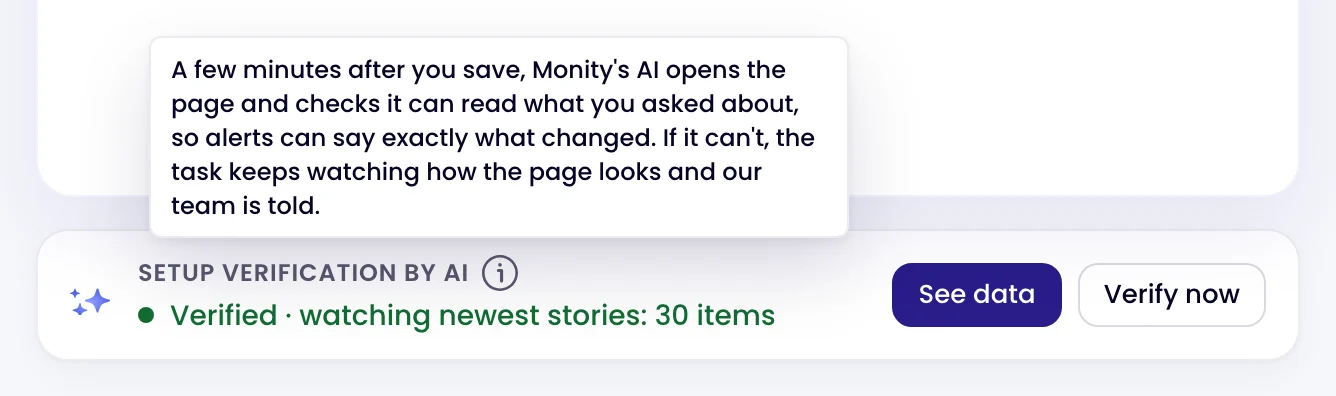
Tell Monity what to watch: a price, the stories on a page, a list of releases. A few minutes after you save, its AI opens the page, closes anything in the way, finds those items and reads them a second time to confirm the reading holds. The task then shows exactly what it reads.
- A single value, a list or a table
- Read the same way on every check
- See data on the task lists every item, with search

Item by item
Each check shows what was added and what was removed.
Every check reads the same data again and compares it with the previous check, item by item. In the check’s Data view, new items are marked New and removed ones Removed, and the overview counts them. The screenshot is still compared too, so a visible change is never missed.
- Changes only hides everything that stayed the same
- Each item keeps its fields, such as a title and its link
- The history keeps every check, so you can look back

Your own value
Ask for the value in your rule, and the alert quotes it.
Write what you want in the task’s Notify me when rule, such as “the GBP to USD rate drops below 1.30; include the rate” or “list each product’s name and price”. The alert quotes those values and every check keeps them. For a strict test with no AI judgement, ask Monity AI for an exact rule: a value read by its text or a JSON path, with conditions such as less than 1.30.
- Values quoted in the alert, in your words
- Exact rules: equals, contains, greater than, less than, changed since the last check
- The values are included in Google Sheets rows and webhook payloads

Examples
Ask for it the way you’d say it.
What people type when they create a task, and the kind of alert that comes back. The summary is written by Monity’s AI from what changed on the page; alerts go to the channels you switch on for the task.
-
 Tell me when a new Python release is added to python.org/downloads
A new Python release was added to the list The check’s Data view shows the new release with its date and link.
Tell me when a new Python release is added to python.org/downloads
A new Python release was added to the list The check’s Data view shows the new release with its date and link. Email · you@company.com
-
Watch the GBP to USD rate and tell me if it goes below 1.30
GBP to USD fell to 1.2987 Sent because the value met your condition: less than 1.30.
 Telegram · private chat
-
Tell me when a plan price changes on coastalcrm.com/pricing
Pro went from $49 to $59 per seat One row per alert, with the time, the page and the summary.
 Google Sheets · Competitor pricing
-
Tell me when Relaylane posts a new role in Europe
Relaylane posted Senior Account Executive, Berlin Other changes to the careers page are left out.
 Slack · #hiring
Coastal CRM and Relaylane are example companies.
FAQ
Questions about Data Extraction
What can Monity extract from a page?
Do I need to write selectors or code?
How does Monity know it is reading the right thing?
What happens when the page changes its layout?
Where does the extracted data go?
Can it read pages behind a login?
Point it at a page and see what it reads.
Start with one page. A few minutes after you save, Monity’s AI shows you exactly what it reads there.
- Free plan: 3 tasks, no card
- 7-day Business trial
- Every alert channel on every plan